1. પરિચય
This user manual provides essential information for the safe and efficient operation of your Sharp 40HF3365E 40-inch FHD QLED Google TV. Please read this manual thoroughly before using the television and retain it for future reference. It covers setup, operation, maintenance, and troubleshooting to ensure you get the most out of your new device.
2. સલામતી માહિતી
Always observe the following safety precautions when operating your television:
- પાવર સ્ત્રોત: ખાતરી કરો કે ટીવી નિર્દિષ્ટ વોલ્યુમમાં પાવર સપ્લાય સાથે જોડાયેલ છેtage શ્રેણી.
- વેન્ટિલેશન: વેન્ટિલેશનના છિદ્રોને અવરોધશો નહીં. યોગ્ય હવા પ્રવાહ માટે ટીવીની આસપાસ પૂરતી જગ્યા આપો.
- પાણી અને ભેજ: ટીવીને વરસાદ કે ભેજના સંપર્કમાં ન લાવો. ટીવી પર પ્રવાહીથી ભરેલી વસ્તુઓ, જેમ કે વાઝ, રાખવાનું ટાળો.
- સફાઈ: સફાઈ કરતા પહેલા ટીવીને અનપ્લગ કરો. નરમ, સૂકા કપડાનો ઉપયોગ કરો. લિક્વિડ ક્લીનર્સ અથવા એરોસોલ ક્લીનર્સનો ઉપયોગ કરશો નહીં.
- પ્લેસમેન્ટ: ટીવીને સ્થિર, સમતલ સપાટી પર મૂકો. તેને સીધા સૂર્યપ્રકાશમાં અથવા ગરમીના સ્ત્રોતોની નજીક રાખવાનું ટાળો.
- બાળકો: બાળકોને ટીવી કે સ્ટેન્ડ પર ચઢતા અટકાવવા માટે તેમની દેખરેખ રાખો.
- સર્વિસિંગ: ટીવીની જાતે સર્વિસ કરવાનો પ્રયાસ કરશો નહીં. બધી સર્વિસિંગ લાયકાત ધરાવતા સેવા કર્મચારીઓને સોંપો.
3. બોક્સમાં શું છે
Upon unpacking your Sharp 40HF3365E Google TV, please verify that all the following components are included:
- Sharp 40HF3365E Television
- પાવર કેબલ
- રીમોટ કંટ્રોલ
- સ્ટેન્ડ (2 ટુકડાઓ)
- વપરાશકર્તા માર્ગદર્શિકા (આ દસ્તાવેજ)
- વોરંટી કાર્ડ
- AAA બેટરી (રિમોટ કંટ્રોલ માટે 2)

છબી: આગળ view of the Sharp 40HF3365E Google TV displaying the Google TV home screen with various streaming app icons and content recommendations.
4. સેટઅપ
4.1 સ્ટેન્ડ ઇન્સ્ટોલેશન
તમારા ટેલિવિઝન સાથે સ્ટેન્ડ જોડવા માટે:
- સ્ક્રીનને નુકસાન ન થાય તે માટે ટીવીનો ચહેરો નરમ, સપાટ સપાટી પર કાળજીપૂર્વક નીચે રાખો.
- દરેક સ્ટેન્ડ પીસને ટીવીના તળિયે અનુરૂપ સ્લોટ્સ સાથે સંરેખિત કરો.
- આપેલા સ્ક્રૂનો ઉપયોગ કરીને સ્ટેન્ડને સુરક્ષિત કરો. ખાતરી કરો કે તે મજબૂત રીતે કડક છે.

છબી: આગળ view of the Sharp 40HF3365E television, showcasing its frameless design and the attached stand feet.
4.2 કનેક્ટિંગ ઉપકરણો
Connect your external devices (e.g., cable box, Blu-ray player, gaming console) to the TV's input ports. The Sharp 40HF3365E features multiple HDMI and USB ports.
- એચડીએમઆઈ: For high-definition audio and video. Connect an HDMI cable from your device to any of the TV's HDMI ports.
- યુએસબી: For connecting USB storage devices to play media or for service updates.
- એન્ટેના/કેબલ: Connect your antenna or cable TV feed to the RF input.
- ઈથરનેટ: વાયર્ડ ઇન્ટરનેટ કનેક્શન માટે.
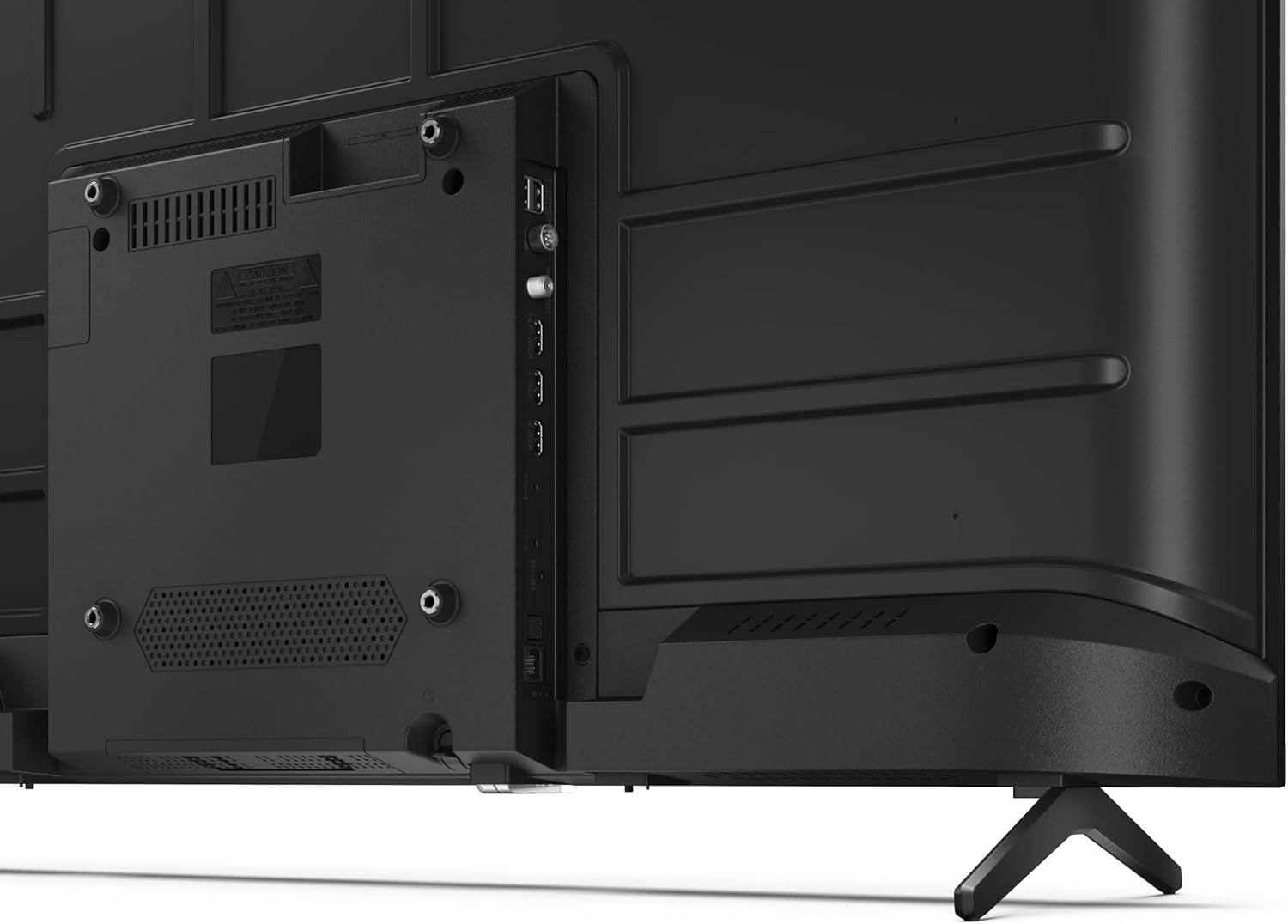
છબી: પાછળનો ભાગ view of the Sharp 40HF3365E television, highlighting the arrangement of its input and output ports, including HDMI, USB, and antenna connections.

છબી: સાઇડ પ્રોfile of the Sharp 40HF3365E television, illustrating the slim design and the location of side-mounted connectivity ports for easy access.
૩.૨ પ્રારંભિક પાવર ઓન અને ગૂગલ ટીવી સેટઅપ
After connecting all necessary cables, plug the power cable into an electrical outlet. Press the power button on the remote control to turn on the TV.
- તમારી ભાષા અને પ્રદેશ પસંદ કરવા માટે ઑન-સ્ક્રીન સૂચનાઓને અનુસરો.
- વાયર્ડ કનેક્શન માટે તમારા Wi-Fi નેટવર્કથી કનેક્ટ કરો અથવા ઇથરનેટ કેબલનો ઉપયોગ કરો.
- Google TV સુવિધાઓ, ઍપ અને વ્યક્તિગત ભલામણોને ઍક્સેસ કરવા માટે તમારા Google એકાઉન્ટ વડે સાઇન ઇન કરો.
- જો તમે એન્ટેના અથવા કેબલ કનેક્શનનો ઉપયોગ કરી રહ્યા છો, તો ચેનલ સ્કેન પૂર્ણ કરો.
૫. ટીવી ચલાવવું
5.1 રીમોટ કંટ્રોલ ઓવરview
The included remote control allows you to navigate the Google TV interface and control your television's functions. Insert the two AAA batteries into the remote control, observing polarity.

Image: The remote control for the Sharp Google TV, featuring dedicated buttons for popular streaming services, navigation, and Google Assistant.
- પાવર બટન: ટીવી ચાલુ કે બંધ કરે છે.
- સોર્સ બટન: ઇનપુટ સ્ત્રોતો (HDMI, AV, TV) પસંદ કરે છે.
- નેવિગેશન પેડ (ઉપર/નીચે/ડાબે/જમણે/ઓકે): મેનુઓ નેવિગેટ કરે છે અને પસંદગીઓની પુષ્ટિ કરે છે.
- પાછળનું બટન: પાછલી સ્ક્રીન પર પાછા ફરે છે.
- હોમ બટન: Google TV હોમ સ્ક્રીન ઍક્સેસ કરે છે.
- ગૂગલ આસિસ્ટન્ટ બટન: વૉઇસ નિયંત્રણ સક્રિય કરે છે.
- વોલ્યુમ અપ/ડાઉન: વોલ્યુમ સ્તરને સમાયોજિત કરે છે.
- ચેનલ ઉપર/નીચે: ટીવી ચેનલો બદલે છે.
- એપ શોર્ટકટ બટનો: Direct access to popular streaming applications (e.g., Netflix, Prime Video, YouTube).
૪.૨ ગૂગલ ટીવી સુવિધાઓ
Your Sharp TV comes with Google TV integrated, offering a personalized entertainment experience.
- વ્યક્તિગત ભલામણો: Google TV organizes movies, shows, and live TV from all your subscriptions into one place, providing recommendations based on your viewઇતિહાસ.
- Google સહાયક: Press the Google Assistant button on your remote and speak into the microphone to search for content, control smart home devices, get answers, and more.
- Chromecast બિલ્ટ-ઇન: Cast movies, shows, photos, and more from your phone, tablet, or laptop directly to your TV.
- એપ્લિકેશન ઍક્સેસ: Download and enjoy thousands of apps from the Google Play Store.
5.3 કનેક્ટિવિટી
- Wi-Fi: ઇન્ટરનેટ ઍક્સેસ અને સ્ટ્રીમિંગ માટે તમારા ઘરના વાયરલેસ નેટવર્ક સાથે કનેક્ટ થાઓ.
- બ્લૂટૂથ: Pair Bluetooth-enabled devices such as headphones or game controllers for a wireless experience.
- એચડીએમઆઈ: Connect up to three HDMI devices for high-quality audio and video.
- યુએસબી: Two USB ports are available for media playback from external storage.
6. જાળવણી
6.1 તમારું ટીવી સાફ કરવું
To maintain the appearance and performance of your television:
- સ્ક્રીન: નરમ, લિન્ટ-ફ્રી કાપડથી સ્ક્રીનને ધીમેથી સાફ કરો. હઠીલા નિશાનો માટે, સહેજ ડીampપાણી અથવા વિશિષ્ટ સ્ક્રીન ક્લીનરથી કપડાને મિક્સ કરો (સીધા સ્ક્રીન પર સ્પ્રે કરશો નહીં).
- કેબિનેટ: ટીવી કેબિનેટને નરમ, સૂકા કપડાથી સાફ કરો. ઘર્ષક ક્લીનર્સ અથવા સોલવન્ટનો ઉપયોગ કરવાનું ટાળો.
- સફાઈ કરતા પહેલા: સફાઈ કરતા પહેલા હંમેશા ટીવીને પાવર આઉટલેટમાંથી અનપ્લગ કરો.
6.2 સોફ્ટવેર અપડેટ્સ
Your Google TV may receive automatic software updates to improve performance and add new features. Ensure your TV is connected to the internet to receive these updates. You can also manually check for updates in the TV's settings menu.
7. મુશ્કેલીનિવારણ
જો તમને તમારા ટીવીમાં સમસ્યાઓ આવે, તો નીચેની સામાન્ય સમસ્યાઓ અને ઉકેલોનો સંદર્ભ લો:
| સમસ્યા | સંભવિત કારણ / ઉકેલ |
|---|---|
| કોઈ શક્તિ નથી | Check if the power cable is securely plugged into the TV and the wall outlet. Ensure the outlet is functional. |
| કોઈ ચિત્ર નથી, પણ અવાજ છે. | Verify the correct input source is selected. Check cable connections (HDMI, AV). Try restarting the TV. |
| અવાજ નથી, પણ ચિત્ર હાજર છે. | Check the volume level and mute status. Ensure external audio devices are properly connected and selected. |
| રીમોટ કંટ્રોલ કામ કરતું નથી | Replace the batteries. Ensure there are no obstructions between the remote and the TV's IR sensor. Re-pair the remote if it's a Bluetooth remote. |
| Wi-Fi થી કનેક્ટ કરી શકાતું નથી | Check your router and modem. Ensure the Wi-Fi password is correct. Try restarting the TV and your router. |
| ચિત્રની ગુણવત્તાની સમસ્યાઓ (દા.ત., ઝાંખી, વિકૃત) | Check the source resolution. Adjust picture settings in the TV menu. Ensure cables are securely connected. |
8. સ્પષ્ટીકરણો
Key technical specifications for the Sharp 40HF3365E Google TV:
| લક્ષણ | વિગત |
|---|---|
| મોડલ નંબર | 40HF3365E |
| સ્ક્રીન માપ | ૬૫ ઇંચ (૧૬૬ સે.મી. કર્ણ) |
| ડિસ્પ્લે ટેકનોલોજી | QLED |
| ઠરાવ | ૧૦૮૦પી (ફુલ એચડી, ૧૯૨૦ x ૧૦૮૦ પિક્સેલ્સ) |
| તાજું દર | 60 હર્ટ્ઝ |
| ઓપરેટિંગ સિસ્ટમ | ગૂગલ ટીવી |
| ખાસ લક્ષણો | QLED, Google Assistant with microphone, Chromecast built-in, HDR10 compatible |
| કનેક્ટિવિટી ટેકનોલોજી | બ્લૂટૂથ, ઇથરનેટ, HDMI (x3), USB (x2), વાઇ-ફાઇ |
| ઓડિયો આઉટપુટ | 2x8W |
| પાસા રેશિયો | 16:9 |
| ઉત્પાદનના પરિમાણો (WxDxH) | ૨૪.૧૫ x ૧.૮૬ x ૧૪.૦૪ સેમી (સ્ટેન્ડ વગર) |
| વજન | 5.4 કિગ્રા |
| ઉર્જા કાર્યક્ષમતા વર્ગ | E |

Image: Technical diagram illustrating the precise dimensions of the Sharp 40HF3365E television, including width, height, depth, and screen diagonal.

Image: The EU energy efficiency label for the Sharp 40HF3365E television, indicating its energy class 'E' and power consumption.
9. વોરંટી અને સપોર્ટ
Your Sharp 40HF3365E Google TV is covered by a manufacturer's warranty. Please refer to the included Warranty Card for detailed terms and conditions, including the warranty period and coverage. For technical support, service inquiries, or to obtain replacement parts, please visit the official Sharp support website or contact their customer service department. Contact information can typically be found on the Warranty Card or the manufacturer's webસાઇટ
Supportનલાઇન સપોર્ટ: For the latest support information, FAQs, and software downloads, please visit the official Sharp webસાઇટ


