પરિચય
Thank you for choosing the DEWENWILS Indoor Remote Control Outlet. This device provides a convenient way to control your indoor electrical appliances with a wireless remote, eliminating the need to manually plug and unplug items. Its compact design and strong RF signal make it ideal for various household applications.
સલામતી માહિતી
- For indoor use only. Do not expose to water or damp શરતો
- Do not exceed the maximum load rating of 10A/1200W, 1/3HP.
- Ensure the device is properly plugged into a grounded outlet.
- સફાઈ કરતા પહેલા ઉપકરણને દિવાલના આઉટલેટમાંથી અનપ્લગ કરો.
- બાળકોની પહોંચથી દૂર રાખો.
- The outlet will remain in the OFF state after a power outage સલામતી માટે.
પેકેજ સામગ્રી
- 1 x DEWENWILS Indoor Remote Control Outlet
- 1 x Wireless Remote Control with Keychain
- 1 x AAA Battery (pre-installed in remote)

સેટઅપ
- બેટરી દાખલ કરો: The remote control comes with a pre-installed AAA battery. Remove the plastic tab from the battery compartment to activate the remote.
- Plug in the Outlet: Insert the DEWENWILS remote control outlet into any standard 3-prong indoor wall outlet. The indicator light on the outlet will illuminate briefly.
- ઉપકરણ કનેક્ટ કરો: Plug your desired appliance (e.g., lamp, fan, Christmas lights) into the remote control outlet.
- પ્રારંભિક ઉપયોગ: The remote and outlet are pre-programmed for immediate use. Press the 'ON' button on the remote to turn on the connected appliance, and 'OFF' to turn it off.
Pairing Additional Remotes/Outlets (Optional)
This system is expandable. To pair additional DEWENWILS remotes or outlets (same model only), follow these steps:
- Plug the new outlet into a wall socket.
- Press and hold the program button on the side of the outlet until the indicator light flashes.
- While the indicator light is flashing, press the 'ON' button for the desired channel (e.g., '1', '2', '3') on your remote control. The indicator light on the outlet will stop flashing and remain solid, indicating successful pairing.
ઓપરેટિંગ સૂચનાઓ
રીમોટ કંટ્રોલનો ઉપયોગ કરીને
- દબાવો ON button on the remote to turn on the connected appliance.
- દબાવો બંધ button on the remote to turn off the connected appliance.
- The remote control operates using an RF signal, allowing it to work through walls and doors with a range of up to 100 feet in open areas. Line of sight is not required.


મેન્યુઅલ ઓપરેશન
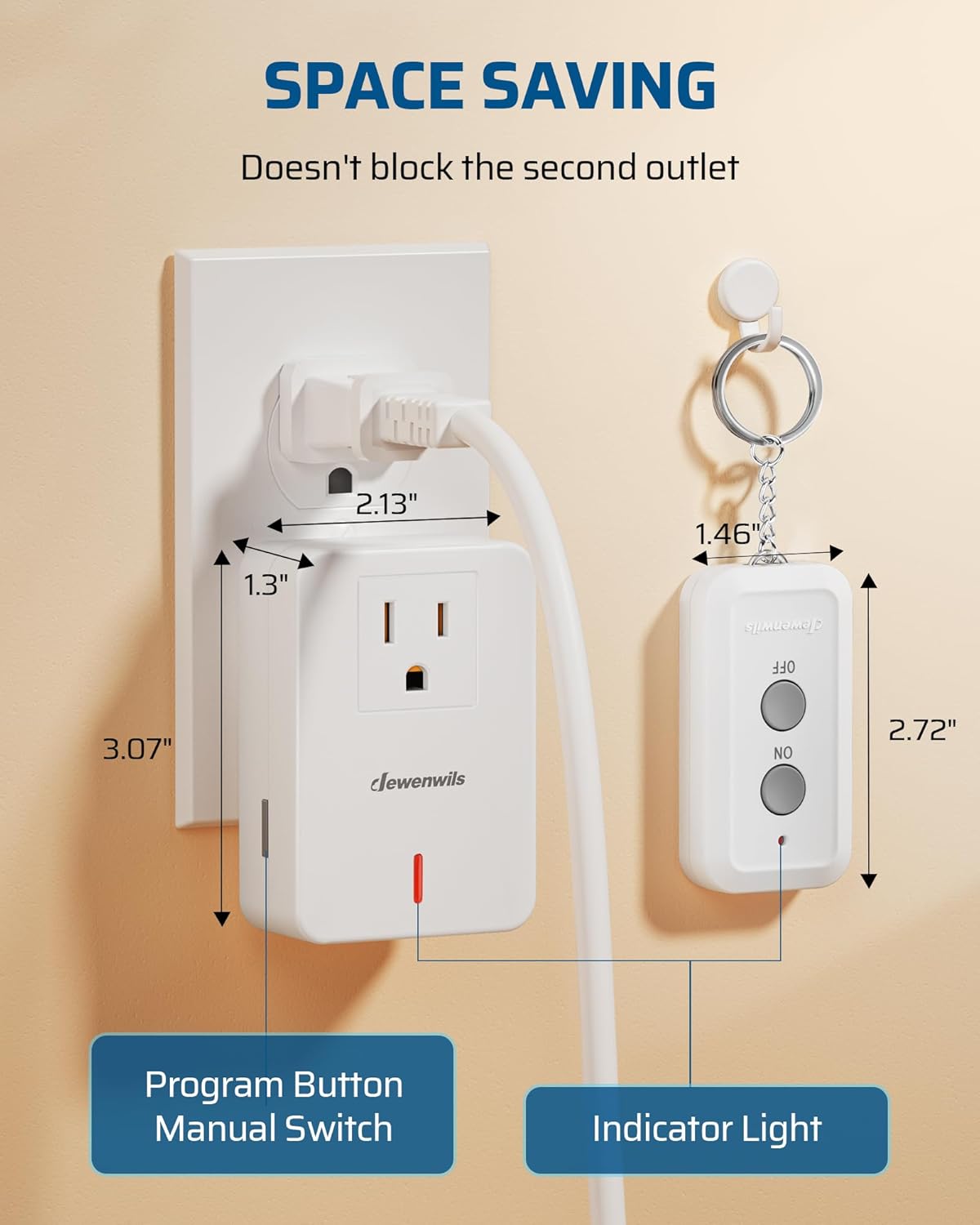
The remote control outlet also features a manual program button on its side. Pressing this button will toggle the power to the connected appliance ON or OFF, providing an alternative control method directly at the outlet.
જાળવણી
- સફાઈ: Disconnect the outlet from the power source before cleaning. Wipe with a dry, soft cloth. Do not use liquid cleaners.
- રિમોટ બેટરી રિપ્લેસમેન્ટ: If the remote control's indicator light does not illuminate or its range decreases significantly, replace the AAA battery. Open the battery compartment on the back of the remote, replace the old battery with a new AAA battery, and ensure correct polarity.
મુશ્કેલીનિવારણ
- Appliance not turning ON/OFF:
- Ensure the remote control outlet is securely plugged into a working wall outlet.
- Verify the appliance is properly plugged into the remote control outlet.
- Check if the appliance itself is switched ON (if it has its own power switch).
- Replace the remote control battery if it is low or depleted.
- Re-pair the remote control with the outlet following the 'Pairing Additional Remotes/Outlets' steps in the Setup section.
- ઘટાડેલી રિમોટ રેન્જ:
- રિમોટ કંટ્રોલ બેટરી બદલો.
- Ensure there are no large metal objects or thick walls heavily obstructing the signal path.
વિશિષ્ટતાઓ
| લક્ષણ | સ્પષ્ટીકરણ |
|---|---|
| મોડલ નંબર | BH9912U-18D |
| ઉત્પાદન પરિમાણો | 3.5 x 2.36 x 3.07 ઇંચ |
| વસ્તુનું વજન | 3.17 ઔંસ |
| વર્તમાન રેટિંગ | 10 Amps |
| સંચાલન ભાગtage | 125 વોલ્ટ |
| ઓપરેશન મોડ | ON-OFF-ON |
| સંપર્ક પ્રકાર | સામાન્ય રીતે ખોલો |
| કનેક્ટર પ્રકાર | પ્લગ |
| એક્ટ્યુએટર પ્રકાર | બટન દબાવો |
| રિમોટ બેટરી | 1 AAA બેટરી (શામેલ) |
| આરએફ રેન્જ | Up to 100ft (open area) |
વોરંટી અને આધાર
For warranty information or technical support, please refer to the product packaging or contact DEWENWILS customer service directly. Contact details can typically be found on the manufacturer's official webસાઇટ અથવા તમારા ખરીદી પ્લેટફોર્મ દ્વારા.


