1. પરિચય
This manual provides essential instructions for the assembly, operation, and maintenance of your Arcade1Up Ms. Pac-Man Classic SE Arcade Machine. Please read this manual thoroughly before use to ensure proper function and safety.

Image 1: The Arcade1Up Ms. Pac-Man Classic SE Arcade Machine, featuring vibrant blue and pink artwork with Ms. Pac-Man characters.
2. સલામતી માહિતી
કૃપા કરીને નીચેની સલામતી સાવચેતીઓનું પાલન કરો:
- Keep the arcade machine away from water or excessive moisture.
- ખાતરી કરો કે પાવર કોર્ડ ક્ષતિગ્રસ્ત અથવા તૂટેલી નથી.
- Do not attempt to open or modify the machine. Refer all servicing to qualified personnel.
- Place the machine on a stable, level surface to prevent tipping.
- ઉપયોગ દરમિયાન બાળકોનું નિરીક્ષણ કરો.
3. પેકેજ સામગ્રી
Your Arcade1Up Ms. Pac-Man Classic SE Arcade Machine package includes:
- Arcade Machine Cabinet
- પાવર એડેપ્ટર
- સૂચના માર્ગદર્શિકા (આ દસ્તાવેજ)
Note: An optional riser may be sold separately.
4. સેટઅપ
4.1 એસેમ્બલી
The Arcade1Up Ms. Pac-Man Classic SE Arcade Machine requires some assembly. Follow the detailed instructions provided in the separate assembly guide included with your product. Ensure all screws and fasteners are securely tightened before use.

Image 2: Dimensions of the Arcade1Up Ms. Pac-Man Classic SE Arcade Machine, showing its height of 45.4 inches without a riser and indicating an optional riser is sold separately.
4.2 પાવર કનેક્શન
- Locate the power input port on the back of the arcade machine.
- Connect the provided power adapter to the machine.
- પાવર એડેપ્ટરને પ્રમાણભૂત ઇલેક્ટ્રિકલ આઉટલેટમાં પ્લગ કરો.
- Ensure the power switch (if present) is in the 'OFF' position before plugging in.
વિડિઓ ૧: એક ઓવરview of the Arcade1Up Ms. Pac-Man Classic SE Arcade Machine, demonstrating its features and setup in a home environment. This video is provided by the seller.
5. ઓપરેટિંગ સૂચનાઓ
5.1 પાવરિંગ ચાલુ/બંધ
Locate the power switch on the control panel. Flip the switch to 'ON' to power on the machine. Flip to 'OFF' to power off.
૩.૨ રમત પસંદગી
Upon powering on, you will see a game selection menu. Use the joystick to navigate through the available games. Press the 'Start Game' button to select and launch your desired game.
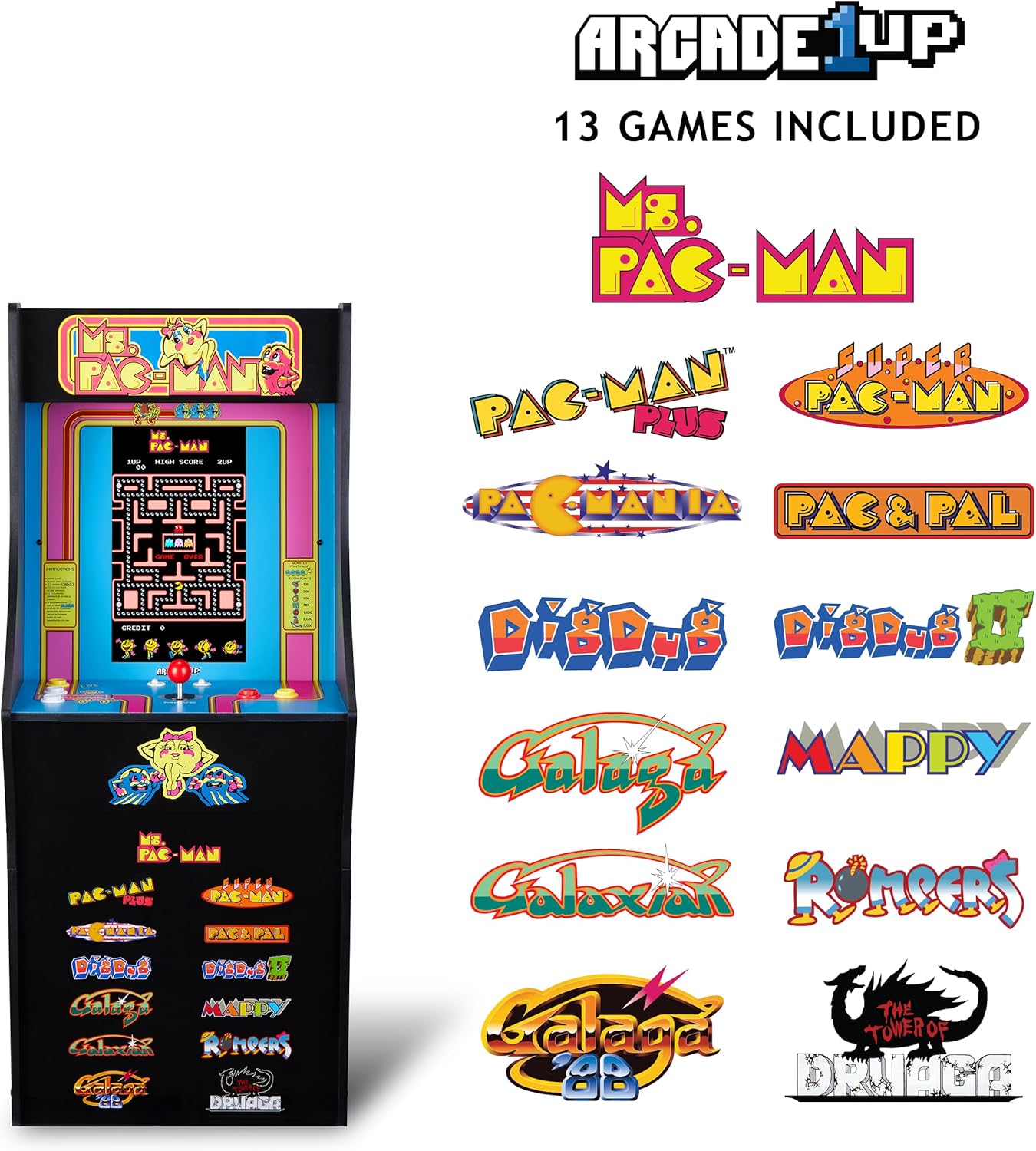
Image 3: The Arcade1Up Ms. Pac-Man Classic SE Arcade Machine displaying the list of 13 included games, such as Ms. Pac-Man, Dig Dug, and Galaga.
5.3 નિયંત્રણો
- જોયસ્ટિક: Used for character movement in games.
- Start Game Button: Initiates a game or confirms selection.
- ક્રિયા બટનો: Used for specific in-game actions (e.g., firing, jumping).
- વોલ્યુમ નિયંત્રણ: Adjust the game sound level using the dedicated volume buttons.
- To return to the game selection menu or save a high score, hold the 'Start Game' button for 5 seconds.
- To reset a game, hold the 'Start Game' button for 5 seconds.

છબી 4: વિગતવાર view of the control panel, highlighting the joystick, start game button, and other action buttons for gameplay.
5.4 Included Games
Your Arcade1Up Ms. Pac-Man Classic SE Arcade Machine includes 13 classic games:
- Ms. PAC-MAN
- PAC-MAN PLUS
- SUPER PAC-MAN
- PAC & PAL
- PACMANIA
- DIG DUG
- DIG DUG 2
- GALAGA
- GALAXIAN
- GALAGA 88
- MAPPY
- ROMPERS
- THE TOWER OF DRUAGA
5.5 WiFi Leaderboards
Connect your arcade machine to WiFi to access online leaderboards and compete for high scores globally. Refer to the on-screen prompts for WiFi setup and leaderboard access.
Video 2: Gameplay footage of the Arcade1Up Ms. Pac-Man Classic SE Arcade Machine, showcasing the classic arcade experience and the online leaderboard feature. This video is provided by the seller.
6. જાળવણી
- સફાઈ: Use a soft, dry cloth to wipe down the cabinet and screen. Avoid abrasive cleaners or excessive moisture.
- સંગ્રહ: મશીનને સીધા સૂર્યપ્રકાશ અને અતિશય તાપમાનથી દૂર ઠંડી, સૂકી જગ્યાએ સંગ્રહિત કરો.
- પાવર કોર્ડ: નુકસાનના કોઈપણ ચિહ્નો માટે પાવર કોર્ડનું નિયમિતપણે નિરીક્ષણ કરો.
7. મુશ્કેલીનિવારણ
| સમસ્યા | સંભવિત કારણ | ઉકેલ |
|---|---|---|
| મશીન ચાલુ થતું નથી. | પાવર કોર્ડ જોડાયેલ નથી; આઉટલેટ કામ કરતું નથી. | ખાતરી કરો કે પાવર કોર્ડ સુરક્ષિત રીતે પ્લગ ઇન થયેલ છે. બીજા ઉપકરણ સાથે આઉટલેટનું પરીક્ષણ કરો. |
| કોઈ અવાજ નથી. | Volume turned down; speaker issue. | Check volume settings on the control panel. If problem persists, contact support. |
| Game freezes or crashes. | Software glitch; temporary error. | Power off the machine, wait 10 seconds, then power back on. |
8. સ્પષ્ટીકરણો
| લક્ષણ | વિગત |
|---|---|
| મોડલ નંબર | MSP-A-405629 |
| પરિમાણો (H x W x D) | 45.4" x 17.35" x 45.4" (without riser) |
| સ્ક્રીન માપ | 15.6 Inches IPS Color Monitor |
| રમતોની સંખ્યા | 13 |
| નિયંત્રક પ્રકાર | જોયસ્ટીક |
| પાવર સ્ત્રોત | કોર્ડેડ ઇલેક્ટ્રિક |
| સામગ્રી | પ્લાસ્ટિક, એક્રેલોનિટ્રિલ બ્યુટાડીન સ્ટાયરીન (ABS) |
| વસ્તુનું વજન | 47 પાઉન્ડ |
| ઉત્પાદકની ભલામણ કરેલ ઉંમર | 10 વર્ષ અને તેથી વધુ |
| કનેક્ટિવિટી | WiFi Leaderboards |
9. વોરંટી અને સપોર્ટ
For warranty information, technical support, or service inquiries, please refer to the official Arcade1Up webસાઇટ પર જાઓ અથવા તેમના ગ્રાહક સેવા વિભાગનો સંપર્ક કરો. વોરંટી દાવાઓ માટે ખરીદીનો પુરાવો રાખો.
Supportનલાઇન સપોર્ટ: www.arcade1up.com


