1. પરિચય
The SVBONY SV241 Pro Astronomical Telescope Power Management Box is designed to centralize power distribution and data connectivity for various astronomy equipment. It features multiple DC outputs, USB ports, and PWM channels, along with intelligent dew point control, to streamline astrophotography and observation setups. This manual provides detailed instructions for the proper setup, operation, and maintenance of your SV241 Pro.
2. સલામતી માહિતી
- Hot-Swapping Warning: Do not hot-swap devices. Only plug or unplug devices after the power is completely turned off. This prevents voltage fluctuations that could damage the product or connected equipment.
- પાવર ઇનપુટ: Ensure the power input matches the specified voltage (12 Volts) and ampઉંમર (10 Amps મહત્તમ).
- સર્કિટ પ્રોટેક્શન: The device includes overvoltage, અન્ડરવોલtage, reverse polarity, short-circuit, electrophoresis, and electrostatic discharge protection. However, always handle connections carefully.
- પર્યાવરણીય પરિસ્થિતિઓ: Operate the device within the specified temperature range (-10°C to 50°C) and humidity (5% to 85% RH).
3. પેકેજ સામગ્રી
ખાતરી કરો કે નીચે સૂચિબદ્ધ બધી વસ્તુઓ તમારા પેકેજમાં શામેલ છે:
- 1X SV241 Astro Management Power Hub
- 1X Dovetail Mounting Base
- 1X DC5.5×2.1 [1m, 20AWG, Right-Angle] power cable
- 2X DC 5.5×2.1 [0.5m, 20AWG, Right-Angle] power cables
- 1X USB Type-B to USB Type-A cable (1m)
- 1X DC 5.5*2.5 Cigarette lighter power adapter cable
- 1X Temperature and humidity sensor
- 1X Temperature probe
- 2X M4x4 Hexagon socket screws
- 1X M2.5 L-shaped wrench

Image: All components included in the SVBONY SV241 Pro package.
4. ઉત્પાદન ઓવરview
The SV241 Pro is a compact and durable power management solution for astrophotography. It integrates various ports and features to simplify your setup.
૧.૨ ઇંટરફેસ પરિચય

છબી: બાજુ view illustrating the DC power input, 5V & 12V indicators, temperature/humidity sensor ports, PWM outputs, regulated DC output, and USB 3.0-B PC interface.

Image: Top and front view detailing the M4 and UNC1/4-20 mounting holes, switchable DC 5.5*2.1 outputs, always-on DC output, USB 3.0 Type-A ports, and 5V 2.5A Max Type-C interface.
- DC 5.5*2.5 Power Input Interface: Main power input (12V 10A Max).
- 5V & 12V Power Indicator: LEDs indicate power status.
- 2.5 Temp & 2.5 T+H Ports: Connect temperature and temperature/humidity sensors.
- PWM1-2 RCA Interface: Pulse Width Modulation channels for dew heaters.
- DC 5.5*2.1 Regulated Interface (0-15V 3A): Adjustable DC output.
- USB 3.0-B PC Interface: Connects the hub to your computer.
- M4 & UNC1/4-20 Holes: For mounting the device.
- DC 5.5*2.1 Switch 1-5 Interface: Five switchable DC outputs.
- DC 5.5*2.1 Always on Interface: One always-on DC output.
- USB 3.0 Type-A Interface: હાઇ-સ્પીડ ડેટા ટ્રાન્સફર માટે બે USB 3.0 પોર્ટ.
- USB 2.0 Type-A Interface: Three USB 2.0 ports.
- 5V 2.5A MAX Type-C Interface: One Type-C port for power and data.
4.2 સર્કિટ પ્રોટેક્શન
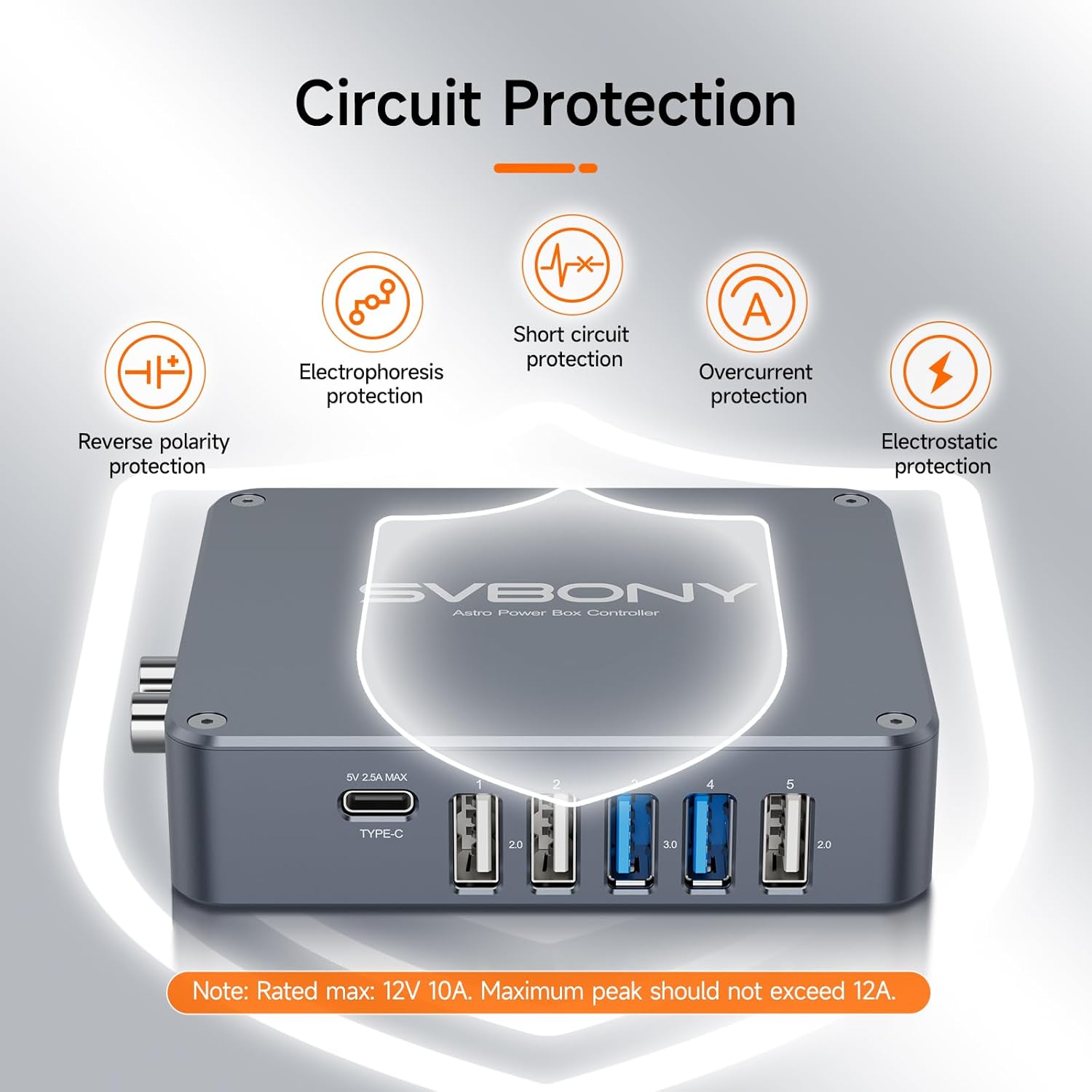
Image: Visual representation of the comprehensive safety features, including reverse polarity, electrophoresis, short circuit, overcurrent, and electrostatic protection.
The SV241 Pro is equipped with multiple protection mechanisms:
- ઓવરકરન્ટ પ્રોટેક્શન વેલ્યુ: 15A
- ઓવરવોલtage રક્ષણ મૂલ્ય: 15V
- અંડરવોલtage રક્ષણ મૂલ્ય: 9.5V
- Reverse polarity & reverse current protection
- 15KV electrostatic discharge protection
5. સેટઅપ
5.1 ઉપકરણને માઉન્ટ કરવાનું
Use the included Dovetail Mounting Base and M4x4 Hexagon socket screws to attach the SV241 Pro to your telescope setup. The device also features UNC1/4-20 holes for alternative mounting options.

છબી: એક ભૂતપૂર્વample setup showing the SV241 Pro integrated with other astrophotography equipment, demonstrating cable management.
5.2 કનેક્ટિંગ પાવર
- Connect the main power source to the DC 5.5*2.5 Power Input Interface using the provided cigarette lighter power adapter cable or a compatible 12V 10A power supply.
- Observe the 5V & 12V Power Indicators. They should glow steadily when the device is operating normally.
5.3 USB ઉપકરણોને કનેક્ટ કરી રહ્યાં છે
- Connect the SV241 Pro to your computer using the USB Type-B to USB Type-A cable. This enables remote control and data transfer.
- Plug your astronomy camera, guide camera, or other USB-powered accessories into the available USB 3.0 Type-A, USB 2.0 Type-A, or 5V 2.5A MAX Type-C interfaces.
5.4 Connecting Dew Heaters and Sensors
- Connect your dew heating belts to the PWM1-2 RCA Interfaces. These channels allow for automatic control based on environmental data.
- Attach the Temperature and humidity sensor to the 2.5 T+H port and the Temperature probe to the 2.5 Temp port. These sensors provide data for intelligent dew point control.
6. ઓપરેટિંગ સૂચનાઓ
6.1 પાવર કંટ્રોલ
The SV241 Pro allows for remote power control of connected devices. The DC 5.5*2.1 Switch 1-5 interfaces can be individually controlled via software. The 'Always on' interface provides continuous power.
6.2 સૉફ્ટવેર સુસંગતતા
The SV241 Pro is fully compatible with NINA (Nighttime Imaging 'N' Astronomy) software. This allows for seamless integration into mainstream astrophotography workflows for direct power control and status monitoring. Firmware has been upgraded to V1.2, adding Power-off Memory functionality.

Image: Screenshot of the NINA software interface, demonstrating remote power control and dew point smart control features of the SV241 Pro.
6.3 Dew Point Intelligent Control
The T+H interface collects humidity data and calculates the dew point. This information is used to automatically control the heating belts connected to the PWM channels, preventing dew formation on optics. The Temp interface monitors the heating belt temperature for precise control.

Image: Close-up of the NTC Thermistor, showing the temperature sensor and temperature + humidity sensor, used for environmental monitoring.
૫.૨.૬ યુએસબી હબ કાર્યક્ષમતા
Each USB port on the SV241 Pro outputs 5V 2.5A with 2.75A over-current protection. The 5V line features reverse current, short-circuit protection, independent MLCC filtering, and 15KV electrostatic discharge protection, ensuring stable and safe power delivery to your USB devices.
6.5 Relevant Video Demonstrations
How to use SV305C Pro Telescope Camera?
Video: This video demonstrates the setup and usage of the SV305C Pro Telescope Camera, which can be connected and powered via the SV241 Pro Power Management Box's USB hub.
MK127 Real imaging of planets by Heavenly Backyard Astronomy
Video: This video showcases real planetary imaging results using a telescope, illustrating the type of advanced astrophotography setups that benefit from centralized power management.
How to use the SV165 guide scope with electronic eyepiece
Video: This video explains how to use the SV165 guide scope with an electronic eyepiece, another common piece of astronomy equipment that can be powered and managed by the SV241 Pro.
7. જાળવણી
- સફાઈ: Use a soft, dry cloth to clean the exterior of the power management box. Avoid using abrasive cleaners or solvents.
- સંગ્રહ: ઉપયોગમાં ન હોય ત્યારે ઉપકરણને સૂકા, ધૂળ-મુક્ત વાતાવરણમાં સંગ્રહિત કરો.
- કેબલ મેનેજમેન્ટ: Ensure all cables are properly routed and secured to prevent strain or damage.
- ફર્મવેર અપડેટ્સ: Check the SVBONY official webશ્રેષ્ઠ કામગીરી અને નવી સુવિધાઓની ઍક્સેસ સુનિશ્ચિત કરવા માટે ઉપલબ્ધ ફર્મવેર અપડેટ્સ માટે સમયાંતરે સાઇટ પર સંપર્ક કરો.
8. મુશ્કેલીનિવારણ
- કોઈ શક્તિ નથી: Ensure the main power cable is securely connected to the DC 5.5*2.5 input and the power source is active. Check the 5V & 12V Power Indicators. If they are off, verify the power supply.
- પીસી દ્વારા ઉપકરણ ઓળખાયું નથી: Ensure the USB 3.0-B cable is securely connected to both the SV241 Pro and your computer. Verify that the necessary drivers are installed (refer to SVBONY support for driver downloads).
- USB Device Disconnections: Ensure all USB connections are secure. Check for any loose cables or damaged ports. If using multiple high-power USB devices, ensure your main power supply is sufficient.
- Dew Heater Malfunction: Verify that dew heaters are correctly connected to the PWM RCA interfaces. Check the temperature and humidity sensors for proper connection and functionality. Ensure the dew point control settings in your software (e.g., NINA) are configured correctly.
- ભાગtage વધઘટ: Always power off the SV241 Pro before connecting or disconnecting any devices to prevent voltagઇ સ્પાઇક્સ.
9. સ્પષ્ટીકરણો
| લક્ષણ | સ્પષ્ટીકરણ |
|---|---|
| ઉત્પાદન પરિમાણો | 3.44 x 3.96 x 0.96 ઇંચ |
| વસ્તુનું વજન | 7.4 ઔંસ |
| આઇટમ મોડલ નંબર | એફડબલ્યુ9193બી |
| બ્રાન્ડ | SVBONY |
| કનેક્ટર પ્રકાર | DC 5.5*2.5 (Input) |
| સુસંગત ઉપકરણો | Astronomy camera, Computer, Lens Heater Warmer |
| ઇનપુટ વોલ્યુમtage | 12 વોલ્ટ |
| Ampઇરેજ | 10 Amps |
| કુલ યુએસબી પોર્ટ્સ | 5 (2x USB 3.0, 3x USB 2.0, 1x Type-C) |
| ખાસ લક્ષણ | ઓવરવોલtage, અન્ડરવોલtage, and reverse polarity safeguards, Remote control, dew point intelligent control |
| રંગ | Gray silver |
10. વોરંટી અને સપોર્ટ
For warranty information and technical support, please refer to the official SVBONY webસાઇટ પર જાઓ અથવા તેમની ગ્રાહક સેવાનો સીધો સંપર્ક કરો. કોઈપણ વોરંટી દાવા માટે ખરીદીના પુરાવા તરીકે તમારી ખરીદી રસીદ રાખો.


