1. પરિચય
This manual provides detailed instructions for the installation, operation, and maintenance of your EDUP USB WiFi 7 Adapter BE6500M (Model: EP-BE1703). This device is designed to provide high-speed wireless connectivity for desktop PCs and laptops, leveraging the latest WiFi 7 (IEEE 802.11be) technology across tri-band frequencies (6GHz, 5GHz, and 2.4GHz). Please read this manual thoroughly before using the product to ensure optimal performance and proper usage.

આકૃતિ 1: EDUP USB WiFi 7 Adapter BE6500M. This image displays the compact design of the USB WiFi adapter with its dual external antennas and USB 3.0 connector.
2. પેકેજ સામગ્રી
Verify that all items listed below are present in your product package. If any items are missing or damaged, please contact customer support.
- 1x EDUP USB WiFi 7 Adapter BE6500Mbps
- 1x U Disk Driver
3. સેટઅપ અને ઇન્સ્ટોલેશન
Follow these steps to install and configure your EDUP USB WiFi 7 Adapter.
3.1 ડ્રાઇવર ઇન્સ્ટોલેશન
The EDUP USB WiFi 7 Adapter requires a driver for proper functionality.
- Insert the provided U Disk Driver into an available USB port on your computer.
- Locate the driver program (e.g., "Setup.exe") on the U Disk.
- Double-click the driver program to initiate the installation process. Follow the on-screen prompts to complete the installation.
- Alternatively, if you do not have a U Disk drive or encounter issues, you can download the latest driver from the official EDUP webસાઇટ: szedup.com/usb-adapters/EPBE1703.html. Ensure you have decompression software installed to extract the driver files જો જરૂરી હોય તો.

આકૃતિ 2: Easy Setup Steps. This image illustrates the three main steps for setup: inserting the adapter, installing the driver from the U disk, and connecting to a Wi-Fi network.
3.2 હાર્ડવેર કનેક્શન
- After driver installation, insert the EDUP USB WiFi 7 Adapter into an available USB 3.0 port on your desktop PC or laptop. For optimal performance, use a USB 3.0 port (typically blue inside).
- Ensure the adapter is securely seated in the USB port.
- Adjust the dual antennas to an upright position or as needed for optimal signal reception. The antennas are 90° rotatable.

આકૃતિ 3: Plug and Play Functionality. This image shows the adapter plugged into a laptop's USB port, highlighting its driver-free (after initial installation), no download, and easy installation aspects.
૩.૩ વાયરલેસ નેટવર્ક સાથે કનેક્ટ થવું
- Once the adapter is installed and recognized by your operating system (Windows 10/11), open your computer's network settings.
- Scan for available wireless networks.
- Select your desired Wi-Fi network from the list and enter the network password (if required).
- The adapter will connect to the network, providing internet access.
૫. કામગીરી અને સુવિધાઓ
4.1 WiFi 7 Tri-Band Connectivity
The EDUP BE6500M adapter utilizes the latest WiFi 7 (IEEE 802.11be) standard, offering high-speed wireless connectivity across three frequency bands:
- 6GHz બેન્ડ: Provides interference-free bandwidth with increased throughput, ideal for demanding applications.
- 5GHz બેન્ડ: Offers high speeds for streaming and gaming.
- 2.4GHz બેન્ડ: Provides wider coverage and compatibility with older devices.
This tri-band capability allows for simultaneous connections for multiple devices, ensuring a stable and lag-free wireless experience. The maximum combined transmission rate is up to 6500Mbps.

આકૃતિ 4: Tri-Band Speed Capabilities. This image illustrates the theoretical maximum speeds for each band: 2882 Mbps on 6GHz, 2882 Mbps on 5GHz, and 688 Mbps on 2.4GHz, totaling 6452 Mbps.
૪.૫ ઉન્નત સિગ્નલ કવરેજ
The adapter features dual external antennas designed to enhance signal strength and extend wireless range. These antennas are rotatable, allowing for flexible adjustment to optimize signal reception and minimize dead zones.
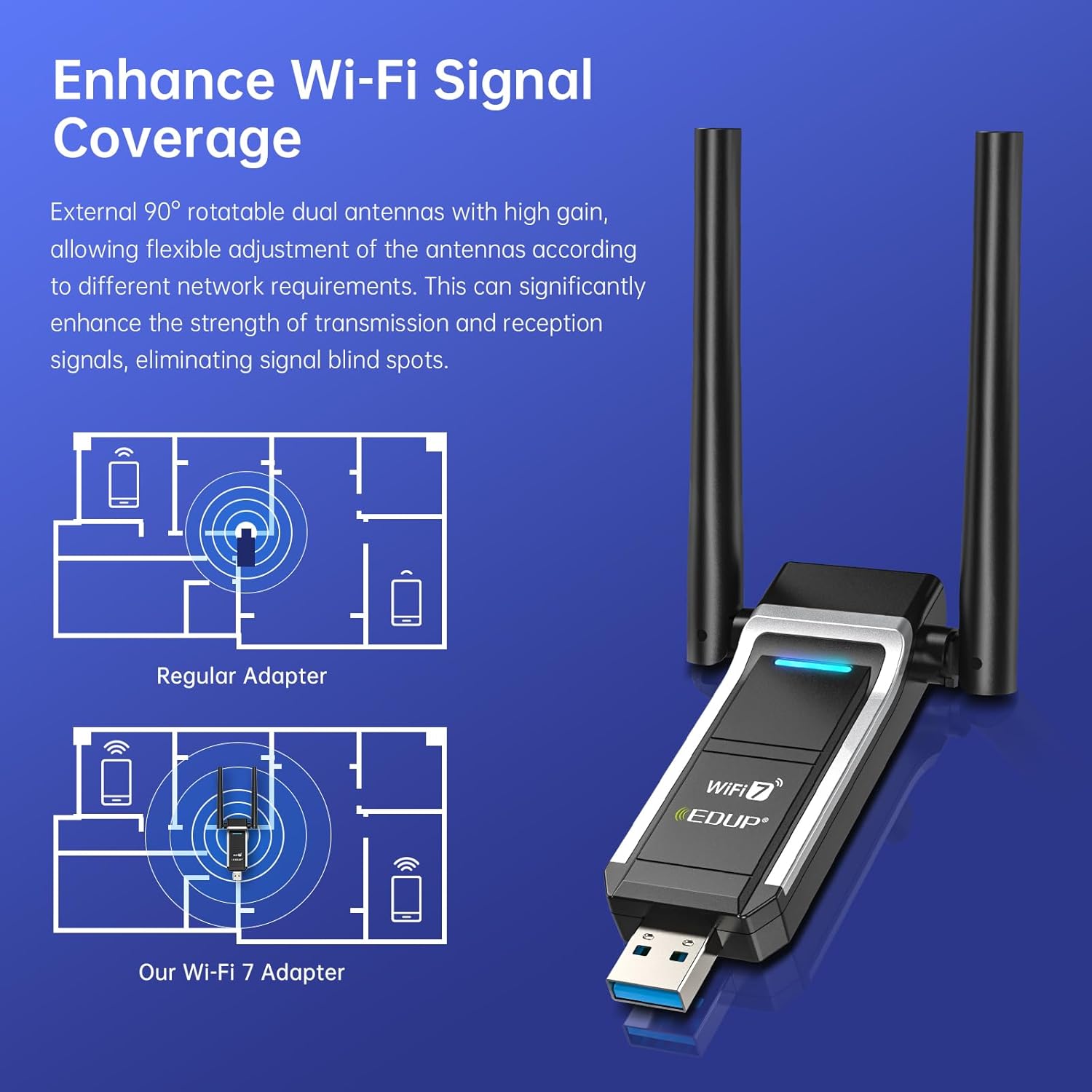
આકૃતિ 5: Signal Coverage Enhancement. This diagram compares the signal coverage of a regular adapter versus the EDUP Wi-Fi 7 adapter, showing improved range and reduced signal blind spots with the dual antennas.
4.3 યુએસબી 3.0 ઈન્ટરફેસ
Equipped with a USB 3.0 interface, the adapter provides data transfer speeds up to 10 times faster than USB 2.0. This ensures quicker response times for data transfers, smooth video streaming, and responsive online gaming.
4.4 Advanced WiFi 7 Technologies (OFDMA & MU-MIMO)
The adapter incorporates advanced WiFi 7 features to optimize network performance:
- OFDMA (ઓર્થોગોનલ ફ્રીક્વન્સી-ડિવિઝન મલ્ટીપલ એક્સેસ): When paired with a compatible router, OFDMA allows your PC to receive data simultaneously with other devices on the same stream. This significantly reduces latency and improves efficiency, especially in busy network environments, leading to minimal lag for videos and games.
- MU-MIMO (મલ્ટી-યુઝર, મલ્ટીપલ-ઇનપુટ, મલ્ટીપલ-આઉટપુટ): MU-MIMO enables the network to efficiently manage bandwidth for multiple devices concurrently. This results in seamless streaming, gaming, and uploads, enhancing overall network efficiency and reducing congestion.
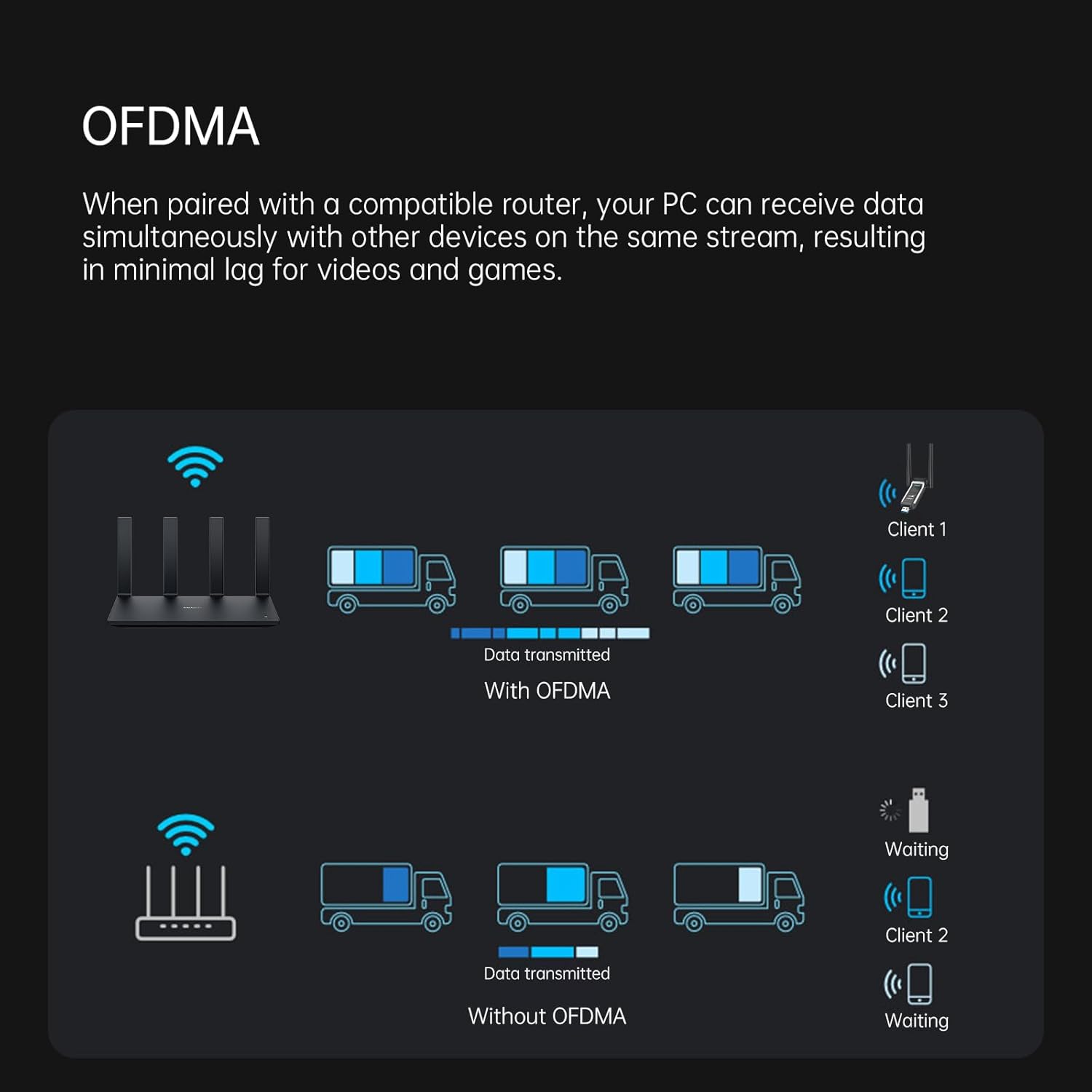
આકૃતિ 6: OFDMA for Low Latency. This diagram illustrates how OFDMA allows a router to transmit data to multiple clients simultaneously, reducing waiting times compared to traditional methods.
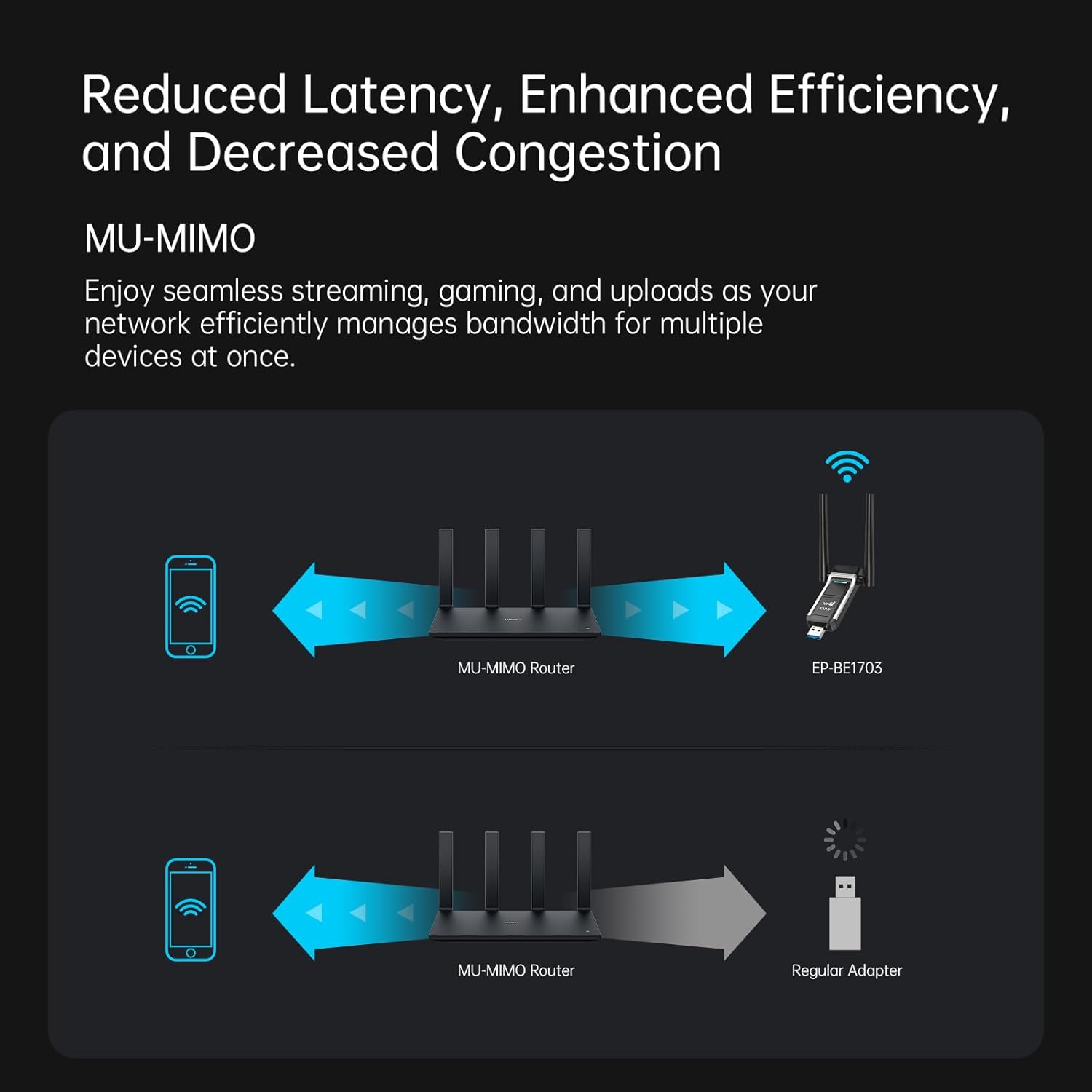
આકૃતિ 7: MU-MIMO for Enhanced Efficiency. This diagram shows how MU-MIMO enables a router to communicate with multiple devices (like the EP-BE1703 adapter) simultaneously, improving overall network performance compared to a regular adapter.
5. જાળવણી
To ensure the longevity and optimal performance of your EDUP USB WiFi 7 Adapter, consider the following maintenance tips:
- સફાઈ રાખો: સમયાંતરે એડેપ્ટરના બાહ્ય ભાગને નરમ, સૂકા કપડાથી સાફ કરો. પ્રવાહી ક્લીનર્સ અથવા સોલવન્ટનો ઉપયોગ કરવાનું ટાળો.
- યોગ્ય સંગ્રહ: જ્યારે ઉપયોગમાં ન હોય, ત્યારે એડેપ્ટરને સીધા સૂર્યપ્રકાશ અને અતિશય તાપમાનથી દૂર ઠંડી, સૂકી જગ્યાએ સંગ્રહિત કરો.
- ફર્મ કનેક્શન: Ensure the adapter is always securely plugged into the USB port to prevent intermittent connections or damage.
- ડ્રાઇવર અપડેટ્સ: Regularly check the EDUP webસાઇટ (szedup.com/usb-adapters/EPBE1703.html) for the latest driver updates to ensure compatibility and performance improvements.
6. મુશ્કેલીનિવારણ
If you encounter issues with your EDUP USB WiFi 7 Adapter, refer to the following common troubleshooting steps:
- કોઈ Wi-Fi કનેક્શન નથી:
- ખાતરી કરો કે એડેપ્ટર USB 3.0 પોર્ટમાં સુરક્ષિત રીતે પ્લગ થયેલ છે.
- ખાતરી કરો કે ડ્રાઇવરો યોગ્ય રીતે ઇન્સ્ટોલ કરેલા છે. જો જરૂરી હોય તો ફરીથી ઇન્સ્ટોલ કરો.
- Check if your Wi-Fi network is broadcasting and visible.
- તમારા કમ્પ્યુટર અને તમારા વાયરલેસ રાઉટરને ફરીથી શરૂ કરો.
- ધીમી કનેક્શન ગતિ:
- Ensure you are connected to the 5GHz or 6GHz band if available, as these offer higher speeds.
- Adjust the adapter's antennas for optimal signal reception.
- Reduce interference by moving the adapter away from other electronic devices.
- Update your router's firmware and the adapter's drivers to the latest versions.
- Ensure your router supports WiFi 7 (802.11be) for maximum performance.
- એડેપ્ટર ઓળખાયેલ નથી:
- એડેપ્ટરને બીજા USB પોર્ટમાં પ્લગ કરવાનો પ્રયાસ કરો.
- Check Device Manager (Windows) to see if the adapter is listed without errors.
- Reinstall the drivers from the U Disk or the official webસાઇટ
- તૂટક તૂટક જોડાણ:
- ખાતરી કરો કે એડેપ્ટર USB પોર્ટમાં મજબૂત રીતે બેઠેલું છે.
- Check for physical obstructions or sources of interference between the adapter and the router.
- Update drivers and router firmware.
જો આ પગલાંઓ તમારી સમસ્યાનું નિરાકરણ ન લાવે, તો કૃપા કરીને EDUP ગ્રાહક સપોર્ટનો સંપર્ક કરો.
7. સ્પષ્ટીકરણો
| લક્ષણ | વિગત |
|---|---|
| મોડલ નંબર | EP-BE1703 |
| હાર્ડવેર ઇંટરફેસ | યુએસબી 3.0 |
| વાયરલેસ માનક | IEEE 802.11be (WiFi 7), 802.11ax/ac/a/b/g/n |
| ફ્રીક્વન્સી બેન્ડ્સ | 6GHz, 5GHz, 2.4GHz (ટ્રાઇ-બેન્ડ) |
| ડેટા ટ્રાન્સફર રેટ | ૯૨૧૪ Mbps સુધી (સંયુક્ત) |
| સુસંગત ઓપરેટિંગ સિસ્ટમ્સ | વિન્ડોઝ 10 (64-બીટ), વિન્ડોઝ 11 (64-બીટ) |
| સુસંગત ઉપકરણો | લેપટોપ, ડેસ્કટોપ પીસી |
| એન્ટેના | Dual External, 90° Rotatable |
| રંગ | કાળો |
| વસ્તુનું વજન | 20 ગ્રામ (0.705 ઔંસ) |
| પેકેજ પરિમાણો | 4.49 x 3.74 x 0.87 ઇંચ |
8. વોરંટી અને સપોર્ટ
EDUP આ ઉત્પાદન માટે નીચેની વોરંટી અને સપોર્ટ પૂરો પાડે છે:
- ઉત્પાદક વોરંટી: 3 years replacement warranty.
- રીટર્ન પોલિસી: 90 days no-questions-asked return policy.
- ગ્રાહક આધાર: For any assistance or inquiries, please contact us via Amazon message.


