1. પરિચય
The Yahboom Raspbot V2 is an open-source AI vision robot car designed for beginners, powered by the Raspberry Pi 5. It features a Mecanum wheel chassis, a high-resolution wide-angle camera, and integrates with the OpenCV image processing library and Media-Pipe machine learning framework. This robot car is capable of advanced functions such as color recognition, target tracking, license plate recognition, autonomous driving, face recognition, and gesture recognition.
The Raspberry Pi 5 brings significant breakthroughs in processor speed, multimedia performance, memory, and connectivity. This enhancement, combined with the robot drive expansion board, greatly boosts the AI capabilities of the Raspbot V2, providing smoother camera operation and more powerful AI functions.
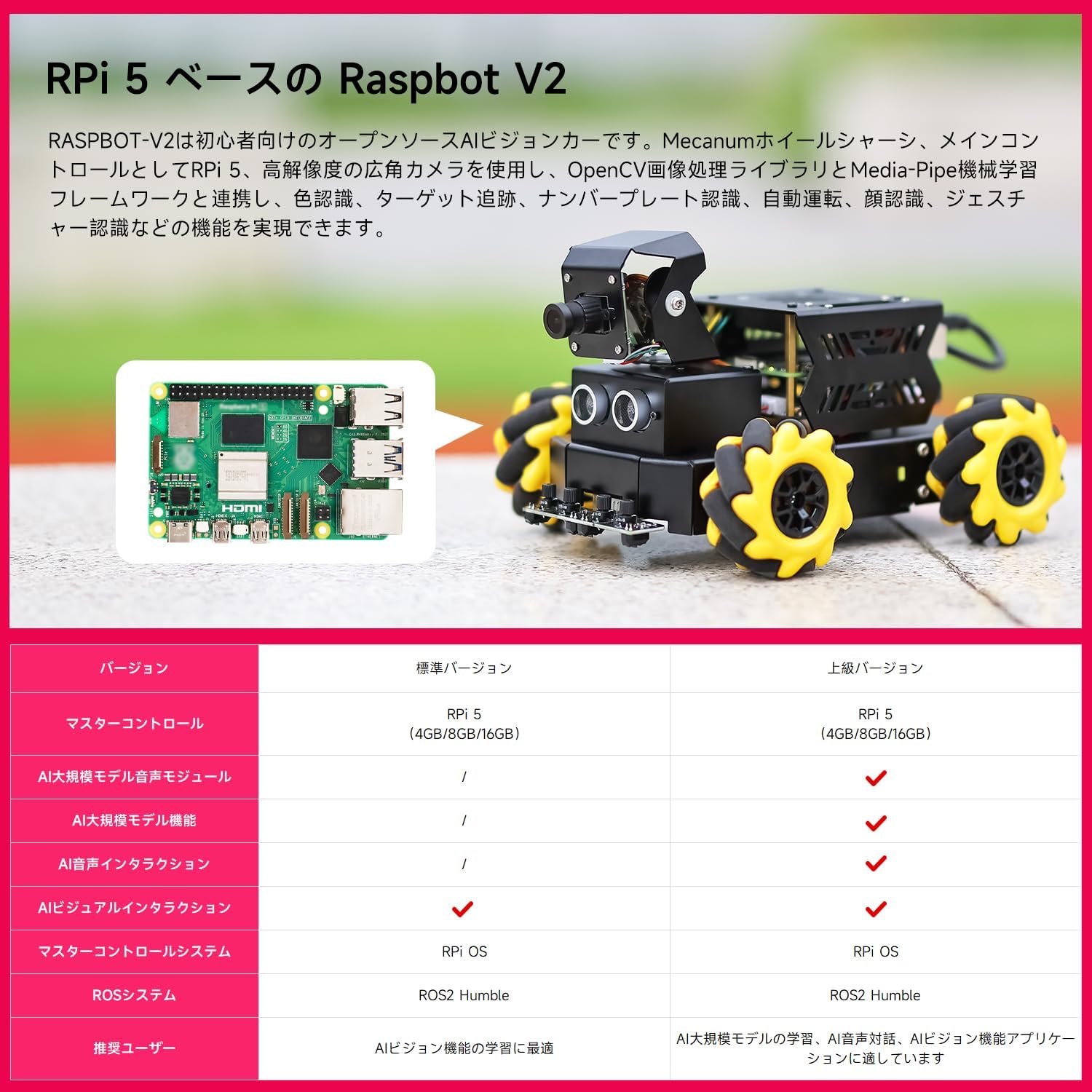
આકૃતિ 1: ઓવરview of the RPi 5 based Raspbot V2, highlighting its core components and capabilities.
Version Comparison
| લક્ષણ | માનક સંસ્કરણ | અદ્યતન સંસ્કરણ |
|---|---|---|
| માસ્ટર કંટ્રોલ | RPi 5 (4GB/8GB/16GB) | RPi 5 (4GB/8GB/16GB) |
| AI લાર્જ મોડેલ વોઇસ મોડ્યુલ | / | ✓ |
| AI Large Model Features | / | ✓ |
| AI વૉઇસ ઇન્ટરેક્શન | / | ✓ |
| AI Visual Interaction | / | ✓ |
| Master Control System | RPi OS | RPi OS |
| ROS System | ROS2 નમ્ર | ROS2 નમ્ર |
| Recommended User | Best for learning AI features | Best for learning AI large models, AI voice interaction, AI vision applications |
Table 1: Comparison of features between the Standard and Advanced versions of Raspbot V2.
2. ઉત્પાદન ઘટકો
The Raspbot V2 comes with various components designed for its advanced functionalities. The chassis is pre-assembled for convenience. Key components include:
- Raspberry Pi 5 (main control)
- Robot Driver Board
- 2DOF Camera PTZ (Pan-Tilt-Zoom) with HD 110° Wide-Angle Camera
- Mecanum Wheels (x4)
- TT Geared Motors
- અલ્ટ્રાસોનિક સેન્સર
- 4-Channel Tracking Sensor
- 7.4V બેટરી પેક
- એડેપ્ટર બોર્ડ
- કૂલિંગ ફેન
- OLED ડિસ્પ્લે
- RGB Colorful Light Bar
- Optional: AI Large Model Voice Module, Speaker
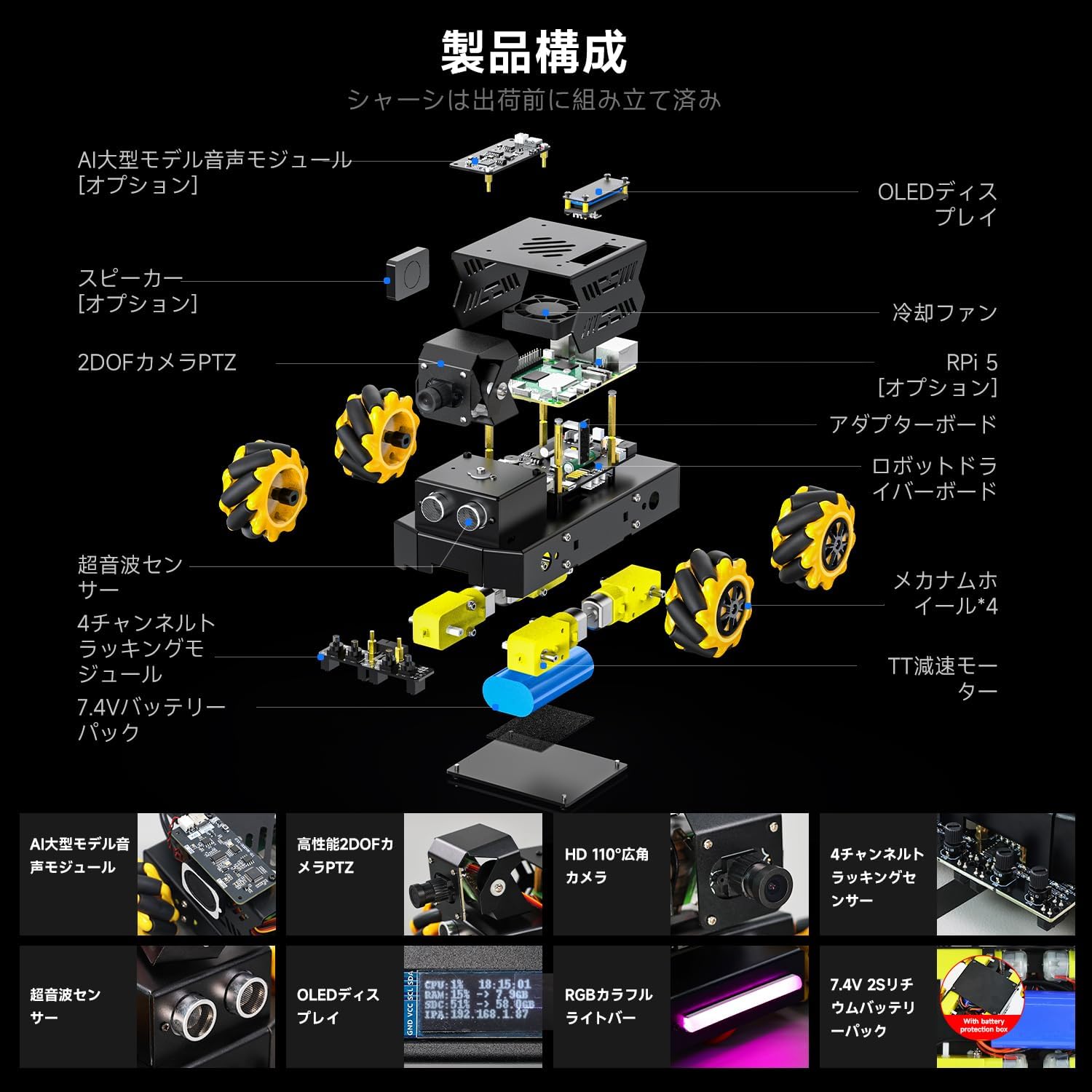
આકૃતિ 2: વિસ્ફોટ થયો view illustrating the various components of the Raspbot V2, including the Raspberry Pi 5, camera, sensors, and drive system.
3. સેટઅપ માર્ગદર્શિકા
3.1. એસેમ્બલી
The main chassis of the Raspbot V2 is pre-assembled before shipment. You will need to attach the Raspberry Pi 5, camera module, and connect the various sensors and motors to the robot driver board. Refer to the detailed assembly instructions provided in the separate assembly guide or online resources for step-by-step visual guidance.
3.2. પાવર કનેક્શન
The Raspbot V2 requires a stable and sufficient power supply, especially with the enhanced performance of the Raspberry Pi 5. It is recommended to use a dedicated 5.1V/5A PD power supply that supports the Pi5 power protocol. This ensures optimal performance and provides enough power for USB peripherals.

Figure 3: Comparison of power supply options for Raspberry Pi 5, emphasizing the benefits of using a dedicated 5.1V/5A PD power supply for optimal performance.
૫. સોફ્ટવેર ઇન્સ્ટોલેશન અને ગોઠવણી
The Raspbot V2 operates on Raspberry Pi OS and utilizes ROS2 Humble for robotics control. Key libraries like OpenCV are used for image processing. Ensure your Raspberry Pi 5 is set up with the latest Raspberry Pi OS. Follow the official Yahboom documentation for installing ROS2 Humble, OpenCV, and any specific drivers or software packages required for the robot's functionalities. This typically involves flashing an SD card with the appropriate image and then performing software updates and installations via the command line.
4. ઓપરેટિંગ સૂચનાઓ
૪.૩. નિયંત્રણ પદ્ધતિઓ
The Raspbot V2 can be controlled through multiple interfaces:
- મોબાઇલ એપ્લિકેશન: Use the dedicated mobile application for remote control and monitoring.
- પીસી સોફ્ટવેર: Control the robot via a PC interface, often used for programming and advanced debugging.
- Remote Control/Handle: Utilize a physical remote control or game handle for intuitive manual operation.
All control methods support FPV (First Person View) image transmission from the HD camera, allowing real-time visual feedback.
4.2. Omnidirectional Movement
Equipped with Mecanum wheels, the Raspbot V2 can achieve 360° omnidirectional movement. This allows for complex maneuvers including forward, lateral (strafing), diagonal movement, and rotation, making it highly versatile in various environments.

આકૃતિ 4: ઉદાamples of omnidirectional movement patterns achievable with Mecanum wheels, including polyline movement, circular drift, and lateral movement.
4.3. AI Vision Applications
The Raspbot V2 leverages its HD camera and AI capabilities to perform a range of intelligent applications:
- Visual Tracking/Following: Identify and track specific objects or colors.
- Autonomous Navigation: Navigate autonomously, avoiding obstacles and following predefined paths or waypoints.
- ઑબ્જેક્ટ ઓળખ: Detect and identify various objects, including 3D objects and specific items like trash.
- ફેસ ડિટેક્શન અને ટ્રેકિંગ: Identify human faces and track their movement.
- માનવ મુદ્રા અંદાજ: Analyze and estimate human body postures.
- હાવભાવ ઓળખ: Interpret human gestures for interactive control.
- Scene Understanding: Analyze visual input to understand the environment and context.
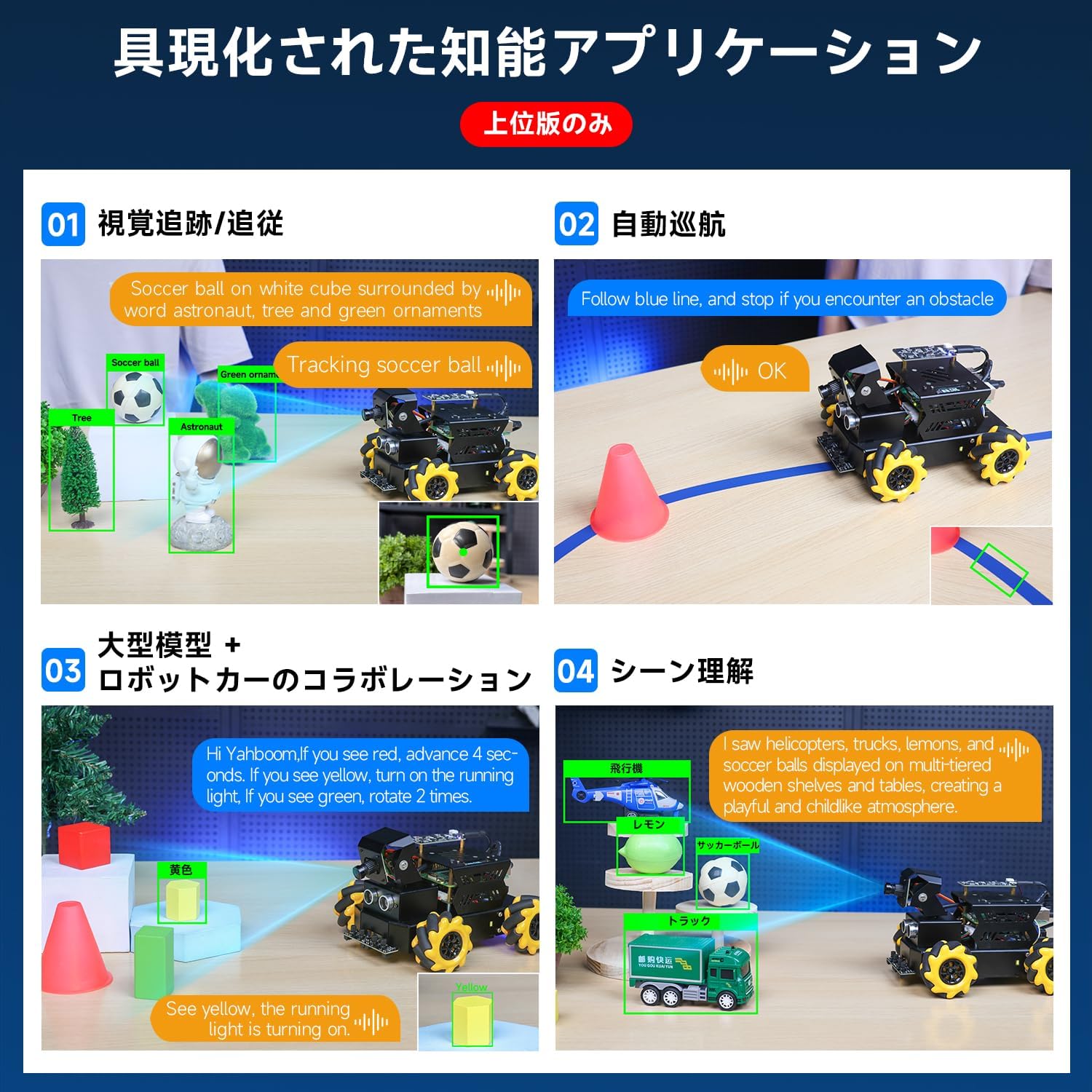
આકૃતિ ૩.૩: વિઝ્યુઅલ એક્સamples of the Raspbot V2's intelligent applications, including visual tracking, autonomous navigation, large model collaboration, and scene understanding.
5. Performance Enhancements (Raspberry Pi 5)
The Raspberry Pi 5 significantly upgrades the robot's processing power and capabilities:
- CPU: Features a new Broadcom BCM2712 processor with 4 Cortex-A76 cores, upgraded from Pi 4B's Cortex-A72. The manufacturing process is reduced from 28nm to 16nm, and the frequency is increased from 1.5GHz to 2.4GHz.
- GPU: Boosted from Pi 4B's 600 MHz VideoCore VI(6) to 800 MHz VideoCore VII(7), supporting OpenGL ES 3.1 and Vulkan 1.2.
- મેમરી: Upgraded to LPDDR4X-4267 for faster data access.
- Power & TF Card Slot: Type-C power supply upgraded to 5V5A with PD support. The protocol supports high-speed SDR104 mode Micro SD cards.
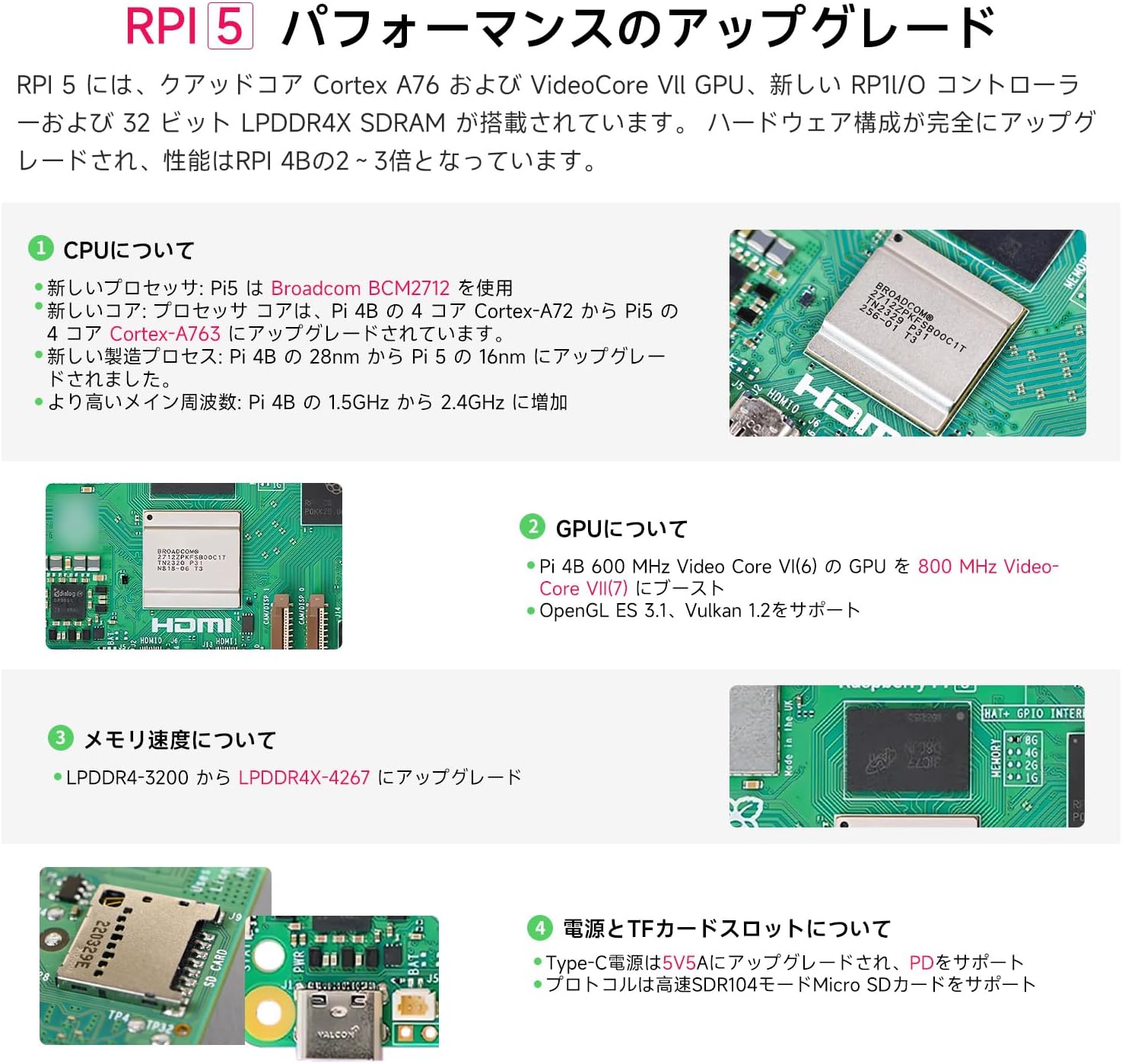
Figure 6: Detailed breakdown of the Raspberry Pi 5's performance upgrades, including CPU, GPU, memory, and power/TF card slot specifications.
6. Cooling Solutions
Due to the increased performance of the Raspberry Pi 5, effective cooling is crucial for stable operation, especially under heavy loads. It is not recommended to use the RPi 5 without a cooling device or with only a heatsink, as this can negatively impact performance. Various cooling solutions are available:
- Pure Copper Heatsink Set: Can be used in conjunction with a cooling fan.
- એક્રેલિક કેસ: Features a removable top cover, includes a PWM cooling fan, and supports camera bracket installation.
- મેટલ કેસ: Made of matte-painted metal and includes a PWM cooling fan.
- Silver ABS Case: Offers a quickly removable design, matte texture, and includes a PWM cooling fan.
- Active Radiator (e.g., Coolbra Pi50): Provides higher heat dissipation efficiency for prolonged full-load operation.
For most users engaged in daily development and learning, a fan-equipped case is recommended. For scenarios requiring the RPi 5 to operate under full load for extended periods, a kit with an active cooler is advisable.

Figure 7: Visual representation of various cooling solutions for the Raspberry Pi 5, including heatsinks and different case types with fans, along with a chart comparing their heat dissipation performance under idle and CPU load conditions.
7. જાળવણી
To ensure the longevity and optimal performance of your Raspbot V2, follow these maintenance guidelines:
- સફાઈ: Regularly clean the robot's chassis, wheels, and sensors to prevent dust and debris buildup. Use a soft, dry cloth. For hard-to-reach areas, use compressed air.
- સૉફ્ટવેર અપડેટ્સ: Keep the Raspberry Pi OS, ROS2, OpenCV, and any other installed software up to date. Regular updates can improve performance, add new features, and fix bugs.
- બેટરી સંભાળ: Follow proper battery charging and storage procedures. Avoid overcharging or completely draining the battery. Store the robot in a cool, dry place when not in use.
- ઘટક નિરીક્ષણ: Periodically check all connections (wires, cables) to ensure they are secure. Inspect the Mecanum wheels for any wear or damage.
8. મુશ્કેલીનિવારણ
જો તમને તમારા Raspbot V2 માં સમસ્યાઓ આવે, તો નીચેના સામાન્ય મુશ્કેલીનિવારણ પગલાં ધ્યાનમાં લો:
- રોબોટ ચાલુ નથી: Ensure the power supply is correctly connected and providing sufficient voltage (5.1V/5A). Check the battery level if using battery power.
- Connectivity Issues (APP/PC Control): Verify that the Raspberry Pi 5 is connected to the network (Wi-Fi) and that your control device is on the same network. Check IP addresses and firewall settings.
- કેમેરા કામ કરતો નથી: Ensure the camera module is securely connected to the Raspberry Pi 5. Check camera software settings and permissions.
- મોટર્સ જવાબ આપતી નથી: Check motor connections to the robot driver board. Verify that the motor drivers are correctly configured in the software. Ensure the battery has enough charge.
- AI Features Not Functioning: Confirm that all necessary AI libraries (e.g., OpenCV, Media-Pipe) are installed and up to date. Check for any error messages in the console output. Ensure sufficient processing power and memory are available.
- ઓવરહિટીંગ: If the Raspberry Pi 5 feels excessively hot, ensure the cooling fan is operating correctly and that there is adequate airflow. Consider upgrading to a more robust cooling solution if operating under continuous heavy load.
For more detailed troubleshooting, refer to the official Yahboom support resources and community forums.
9. સ્પષ્ટીકરણો
- મોડલ: રાસ્પબોટ V2
- Main Control: Raspberry Pi 5 (4GB/8GB/16GB options)
- પ્રોસેસર: Broadcom BCM2712 (Quad-core Cortex-A76 @ 2.4GHz)
- GPU: VideoCore VII (800MHz)
- મેમરી: LPDDR4X-4267 SDRAM
- ચેસીસ: Mecanum Wheel Chassis
- કેમેરા: 2DOF HD 110° Wide-Angle Camera
- સેન્સર્સ: Ultrasonic Sensor, 4-Channel Tracking Sensor
- મોટર: TT Geared Motor
- પાવર સપ્લાય: Recommended 5.1V/5A PD (Type-C)
- બેટરી: 7.4V બેટરી પેક
- ઓપરેટિંગ સિસ્ટમ: રાસ્પબેરી પી ઓએસ
- Robotics Framework: ROS2 નમ્ર
- છબી પ્રક્રિયા: OpenCV, Media-Pipe
10. વોરંટી અને સપોર્ટ
Yahboom products typically come with a standard manufacturer's warranty. Please refer to the warranty card included with your product or visit the official Yahboom webચોક્કસ વોરંટી નિયમો અને શરતો માટે સાઇટ.
For technical support, troubleshooting assistance, or to access additional resources such as detailed assembly guides, software tutorials, and community forums, please visit the official Yahboom support page or contact their customer service directly. Keep your purchase receipt and product model number (Raspbot V2) handy when seeking support.


