


frient સ્માર્ટ પ્લગ મીની

ઉત્પાદન વર્ણન
Frient' Smart Plug Mini એ એક બુદ્ધિશાળી રિમોટલી કંટ્રોલ એડેપ્ટર છે.
સ્માર્ટ પ્લગ મિની પાવર વપરાશ પર નજર રાખે છે અને વપરાશકર્તાને વિશ્વભરમાંથી - અથવા પલંગમાંથી કોઈપણ ઉપકરણને તરત જ ચાલુ અને બંધ કરવાની મંજૂરી આપે છે.
સ્માર્ટ પ્લગ મિની વિવિધ વર્ઝનમાં ઉપલબ્ધ છે.
સાવચેતીનાં પગલાં
- ઉત્પાદન લેબલને દૂર કરશો નહીં કારણ કે તેમાં મહત્વપૂર્ણ માહિતી છે.
- સ્માર્ટ પ્લગ માટે લાંબુ આયુષ્ય ટકાવી રાખવા માટે, મહત્તમ લોડને વારંવાર ચાલુ અથવા બંધ કરવાનું ટાળો.
- સાવચેત રહો કે સ્માર્ટ પ્લગમાં કોઈ પ્રવાહી ન જાય કારણ કે તે સાધનને નુકસાન પહોંચાડી શકે છે.
- જો ઉપકરણનો ઉપયોગ સિગ્નલ તરીકે થાય છે ampલિફાયર, કૃપા કરીને ઉપકરણને કેન્દ્રીય ઉપકરણ અને સેન્સર(ઓ) વચ્ચે સ્થિત કરો.
શરૂ કરી રહ્યા છીએ
- સ્માર્ટ પ્લગ મિનીને પાવર આઉટલેટ સાથે કનેક્ટ કરો.
- સ્માર્ટ પ્લગ મિની હવે ઝિગ્બી નેટવર્ક સાથે જોડાવા માટે સીઅર-ચિંગ (15 મિનિટ સુધી) શરૂ કરશે.
- ખાતરી કરો કે Zigbee નેટવર્ક ઉપકરણોમાં જોડાવા માટે ખુલ્લું છે અને સ્માર્ટ પ્લગ મિની સ્વીકારશે.
- જ્યારે સ્માર્ટ પ્લગ મિની નેટવર્ક શોધી રહ્યું છે, ત્યારે LED બટન લાલ ચમકી રહ્યું છે.
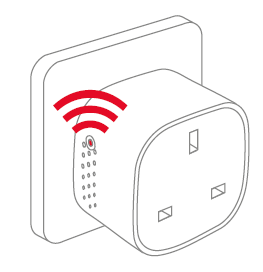
નોંધ: બટન દબાવવાથી સ્માર્ટ પ્લગ મીની ચાલુ થાય છે. LED લાઇટ વારાફરતી લાલ અને લીલી ચમકવા લાગે છે. જ્યારે ઉપકરણ નેટવર્ક શોધી રહ્યું હોય ત્યારે આ રંગ નારંગી/પીળા તરીકે દેખાઈ શકે છે. - જ્યારે LED બટન ફ્લેશિંગ બંધ કરે છે, ત્યારે સ્માર્ટ પ્લગ મિની સફળતાપૂર્વક Zigbee નેટવર્ક સાથે જોડાઈ જાય છે.
પ્લેસમેન્ટ
- સ્માર્ટ પ્લગને 0-50 ડિગ્રી સેલ્સિયસના તાપમાને ઘરની અંદર મૂકો.
- જો ઉપકરણનો ઉપયોગ સિગ્નલ તરીકે થાય છે ampલિફાયર, કૃપા કરીને ઉપકરણને કેન્દ્રીય ઉપકરણ અને સેન્સર(ઓ) વચ્ચે સ્થિત કરો.
રીસેટ કરી રહ્યા છીએ
જો તમે તમારા સ્માર્ટ પ્લગ મિનીને બીજા ગેટવે સાથે કનેક્ટ કરવા માંગતા હોવ, જો તમારે અસામાન્ય વર્તણૂકને દૂર કરવા માટે ફેક્ટરી રીસેટ કરવાની જરૂર હોય અથવા જો તમારે સંચિત રજિસ્ટર અને લૉગ્સ રીસેટ કરવાની જરૂર હોય તો રીસેટ કરવું જરૂરી છે.
રીસેટ કરવા માટેનાં પગલાં
- સ્માર્ટ પ્લગ મિનીને પાવર આઉટલેટ સાથે કનેક્ટ કરો.
- ઉપકરણ પરના બટનને દબાવો અને પકડી રાખો.
- લાલ LED સતત ફ્લેશ ન થાય ત્યાં સુધી બટન દબાવી રાખો, પછી બટન છોડો.

- રીલે પછીasinબટન દબાવવાથી, લાલ LED 2-5 સેકન્ડ સુધી ચાલુ રહેશે. તે સમય દરમિયાન, ઉપકરણને બંધ કે અનપ્લગ ન કરવું જોઈએ.
મોડ્સ
ગેટવે મોડને શોધી રહ્યાં છીએ
- લાલ એલઇડી દર સેકન્ડે ઝળકે છે

સામાન્ય મોડ
ગ્રીન LED એટલે કે સ્માર્ટ પ્લગ આઉટપુટ સક્રિય છે (રિલે ચાલુ છે). LED બટન દબાવીને રિલેને ચાલુ અને બંધ કરી શકાય છે.
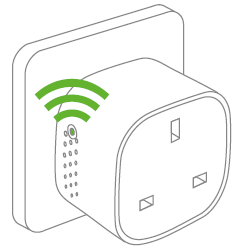
મોડ બંધ
જ્યારે LED બટનમાં કોઈ પ્રકાશ નથી, ત્યારે તેનો અર્થ એ છે કે રિલે બંધ છે (ત્યાં કોઈ આઉટપુટ નથી). LED બટન દબાવીને રિલેને ચાલુ અને બંધ કરી શકાય છે.
ખામી શોધ
• પાવર નિષ્ફળતાના કિસ્સામાં, ઉપકરણ પાવર નિષ્ફળતા પહેલા તેને ચાલુ/બંધ સ્થિતિમાં પુનઃસ્થાપિત કરશે.
• ખરાબ અથવા નબળા સિગ્નલના કિસ્સામાં, સ્માર્ટ પ્લગ મિની અથવા તમારા ગેટવેનું સ્થાન બદલો.
• જો ગેટવેની શોધનો સમય સમાપ્ત થઈ ગયો હોય, તો LED બટન પર એક ટૂંકું પ્રેસ તેને ફરીથી શરૂ કરશે.
અન્ય માહિતી
• સ્માર્ટ પ્લગ મિનીને 10 A સતત લોડ અને 16 A (~3500 W) ટૂંકા સમયના લોડ માટે રેટ કરવામાં આવે છે.
• જો લોડ 16 A કરતાં વધી જાય અથવા આંતરિક તાપમાન ખૂબ ઊંચું થઈ જાય તો તે આપમેળે બંધ થઈ જશે.
• પાવર નિષ્ફળતાના કિસ્સામાં, ઉપકરણ પાવર નિષ્ફળતા પહેલા તેને ચાલુ/બંધ સ્થિતિમાં પુનઃસ્થાપિત કરશે.
નિકાલ
જીવનના અંતે ઉત્પાદનને યોગ્ય રીતે નિકાલ કરો. આ ઇલેક્ટ્રોનિક કચરો છે જેનું રિસાયકલ કરવું જોઈએ.
CE પ્રમાણપત્ર
આ ઉત્પાદન સાથે જોડાયેલ CE ચિહ્ન ઉત્પાદન પર લાગુ થતા યુરોપિયન નિર્દેશો અને ખાસ કરીને, સુમેળભર્યા ધોરણો અને વિશિષ્ટતાઓ સાથેના તેના પાલનની પુષ્ટિ કરે છે.
નિર્દેશો અનુસાર
• રેડિયો ઇક્વિપમેન્ટ ડાયરેક્ટિવ (RED) 2014/53 / EU
• લો વોલ્યુમtage નિર્દેશક (2014/35/EU)
• રોહ્સ ડાયરેક્ટિવ 2015/863 / ઇયુ સુધારેલ 2011/65 / EU
અન્ય પ્રમાણપત્રો
Zigbee હોમ ઓટોમેશન 1.2 પ્રમાણિત
સર્વાધિકાર આરક્ષિત.
આ માર્ગદર્શિકામાં દેખાઈ શકે છે કે જે કોઈપણ ભૂલો માટે frient કોઈ જવાબદારી ધારે છે. તદુપરાંત, ફ્રીઅન્ટ કોઈપણ સમયે સૂચના વિના અહીં વિગતવાર થયેલ હાર્ડવેર, સ softwareફ્ટવેર અને / અથવા સ્પષ્ટીકરણોને બદલવાનો અધિકાર અનામત રાખે છે, અને ફ્રાઈન્ટ અહીં સમાવિષ્ટ માહિતીને અપડેટ કરવાની કોઈ પ્રતિબદ્ધતા કરતું નથી. અહીં સૂચિબદ્ધ બધા ટ્રેડમાર્ક્સ તેમના સંબંધિત માલિકોની માલિકીની છે.
દસ્તાવેજો / સંસાધનો
 | સ્માર્ટ પ્લગ મીની |
સંદર્ભો
- frient - સેન્સર, એલાર્મ, સ્માર્ટ પ્લગ - ઘરની સંભાળ અને સુરક્ષાwww.frient.com
- વપરાશકર્તા માર્ગદર્શિકાmanual.tools
The socket SH-P01 stopped working after about a year of use. Does not start despite resetting. The LED remains completely dark. Also the same thing happened with SH-P01E about 2 years ago.
Replaced with new SH-P01 sockets. Load Max230VAC/ 1A. The new sockets work flawlessly in the same WiFi network. The devices have a CE mark, but not from an inspection body
નંબર?
Pistorasia SH-P01 lakkasi toimimasta noin vuoden käytön jälkeen. Ei käynnisty resetoinnista huolimatta. LED pysyy täysin pimeänä. Myös sama tapahtui SH-P01E noin 2-vuotta sitten.
Korvattu uusilla SH-P01 pistorasioilla. Kuomitus Max230VAC/ 1A. Uudet pistorasiat toimivat samassa WiFi-verkossa moitteettomasti. Laitteissa on CE-merkintä, mutta ei tarkastuslaitoksen
numeroa ?
Replaced with new SH-P01 sockets. Load Max230VAC/ 1A. The new sockets work flawlessly in the same WiFi network. The devices have a CE mark, but not from an inspection body
નંબર?
Pistorasia SH-P01 lakkasi toimimasta noin vuoden käytön jälkeen. Ei käynnisty resetoinnista huolimatta. LED pysyy täysin pimeänä. Myös sama tapahtui SH-P01E noin 2-vuotta sitten.
Korvattu uusilla SH-P01 pistorasioilla. Kuomitus Max230VAC/ 1A. Uudet pistorasiat toimivat samassa WiFi-verkossa moitteettomasti. Laitteissa on CE-merkintä, mutta ei tarkastuslaitoksen
numeroa ?
Why has my Smart Plug Mini stopped working with a dark LED, and why is there no inspection body number next to the CE mark?
Based on the frient Smart Plug Mini manual, if the LED remains completely dark and the device does not respond to a factory reset, it likely indicates a hardware failure or a triggered safety cutoff. Please note the following regarding your SH-P01 model:
Since your new units work on the same network with the same 1A load, and the old units remain unresponsive, we recommend contacting frient support or your retailer for warranty claims, as the manual does not provide further repair steps for a non-responsive LED.
Read the full Q&A page